Notes From a Databricks Delta Lake Training
These are my notes from a three-day Databricks training on Delta Lake and Spark, cleaned up a bit so they make sense to someone other than me. The organizers said up front that the recording and slides would not be shared, so if you want the full course, search Databricks Academy for the self-paced “Data Engineer Learning Plan”. The notebooks are also public in the databricks-academy repo on GitHub.
We run Delta Lake ourselves on MinIO rather than on Databricks, so I’m mostly interested in the parts that are plain Spark and Delta. But I kept the Databricks-only bits too, since this is my record of the course.
Day 1
-
Embrace
spark.sql(...). A lot of the course is written in SQL, and anything you can do with the DataFrame API you can usually also do in SQL against the same tables. Both end up as the same query plan, so this is mostly about which one reads better.
Day 2: Tables
-
The Hive metastore is where table definitions live, meaning the name, the schema, the location of the files, etc. Databricks is pushing Unity Catalog for this now, but the idea is the same.
-
Delta tables are either managed or external. Drop a managed table and both the metadata and the Parquet files are deleted. Drop an external table, which is one created with a
LOCATION, and only the metadata goes away. The files stay where they are. -
To see what a table actually is, use
DESCRIBE.DESCRIBE DETAIL '/data/events/'; DESCRIBE DETAIL events_table; DESCRIBE EXTENDED events_table;DESCRIBE DETAILgives you the Delta-specific stuff such as format, location, number of files and size, andDESCRIBE EXTENDEDadds the storage location, provider and table properties under the schema. -
CREATE SCHEMA IF NOT EXISTS ${da.schema_name}creates a schema, which is a database, not a table. I wrote down “what’s the difference withDeltaTable.createIfNotExists?” during the session, and the answer is that they aren’t the same thing at all.DeltaTable.createIfNotExistsis the Python builder for a table, so its SQL twin isCREATE TABLE IF NOT EXISTS. -
Define the schema when you create the table. Letting Spark guess it works for a demo, but this is where type surprises come from later.
-
CTAS (
CREATE TABLE ... AS SELECT) infers the schema from the query and doesn’t let you pass file options. For something like CSV with a header and a custom delimiter, the course first creates a temp view withUSING CSV OPTIONS (...). Then it does the CTAS from that view. See the course notebook. -
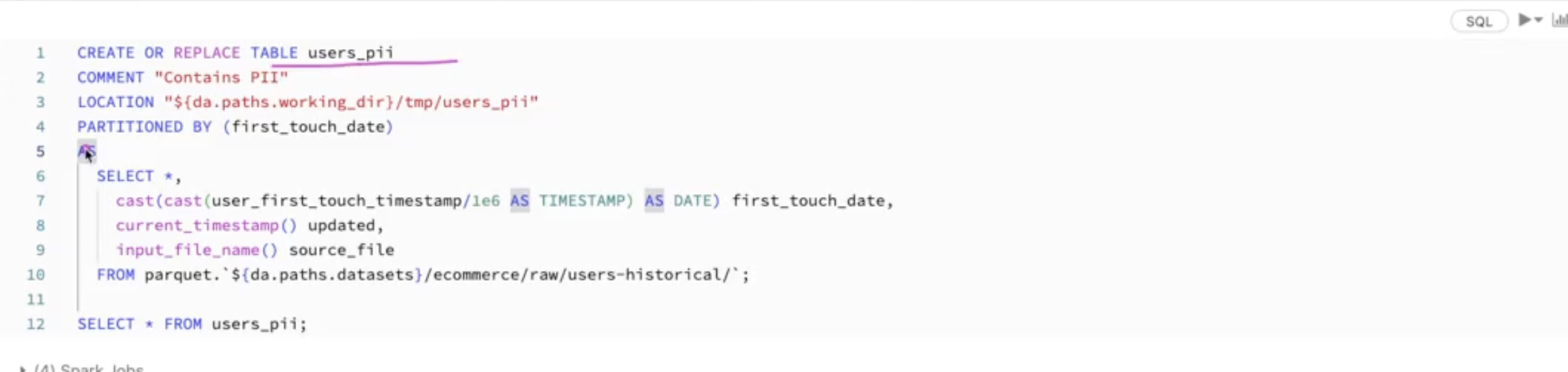
You can enrich a table at creation time with a
COMMENT, aLOCATION, and extra columns.current_timestamp()records when the row was loaded andinput_file_name()records which source file it came from. Both are also inpyspark.sql.functions.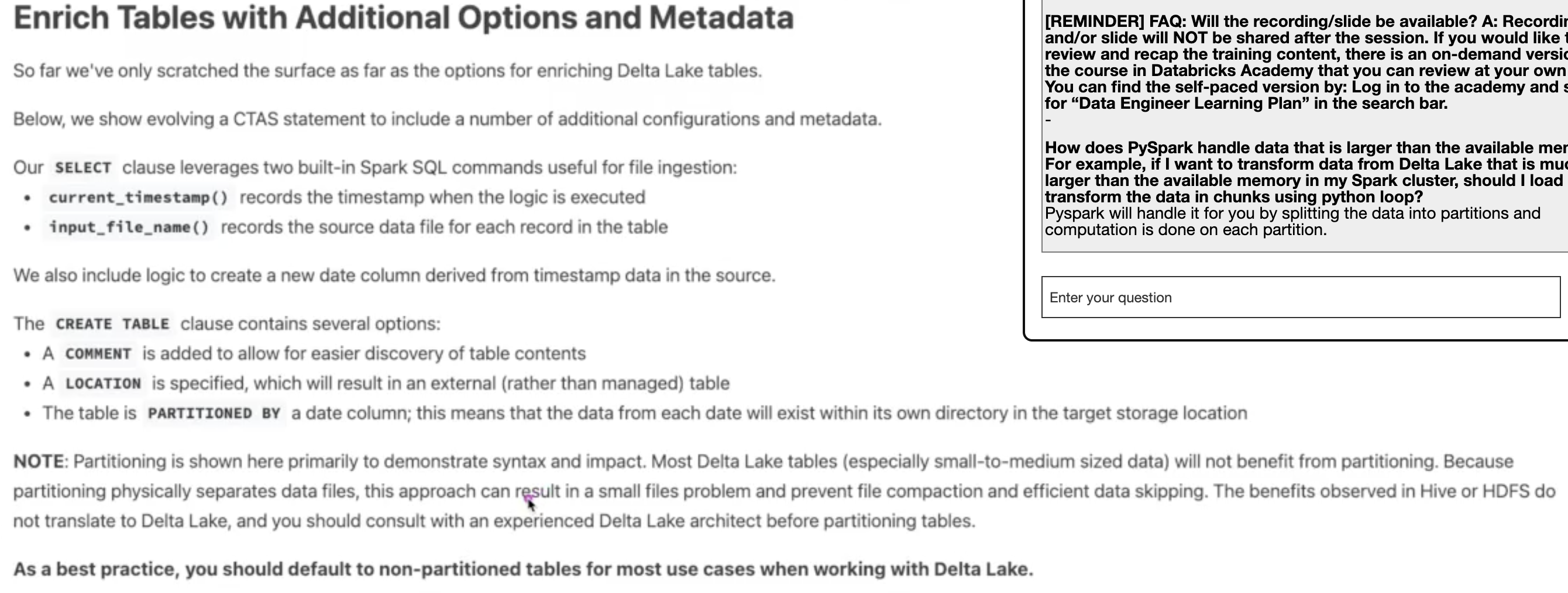
-
As a best practice, don’t partition small Delta tables. The course’s own wording is that most small-to-medium Delta tables won’t benefit from partitioning, because it splits the data into lots of small files and gets in the way of compaction and data skipping. Default to non-partitioned.
-
SHALLOW CLONEcopies only the Delta log and still points at the source table’s files, so it’s cheap and good for testing against real data.DEEP CLONEcopies the files too. -
Avoid the RDD API. The DataFrame and SQL APIs go through Spark’s query optimizer and RDDs don’t.
-
df.schemagives you the schema as an object, and you can reuse it to create another table with the same shape. -
df.collect()pulls all the data from every executor onto the driver. Fine for 10 rows, a crash for 10 billion. -
df.createOrReplaceTempView("name")lets you query a DataFrame with SQL. It’s easy to think this creates a temporary table in memory, but it doesn’t. It’s just a name for the DataFrame’s query plan, scoped to the Spark session. Nothing is computed or cached until you query it. -
DataFrames are immutable, so every transformation returns a new DataFrame and leaves the old one alone.
-
count(*)counts every row, andcount(col)skips rows wherecolis null. -
Use
.to reach into nested struct fields, as inSELECT user.address.city. -
Here’s the course’s example of the timestamp and string helpers, in SQL and PySpark. The
/ 1e6is there becauseuser_first_touch_timestampis in microseconds.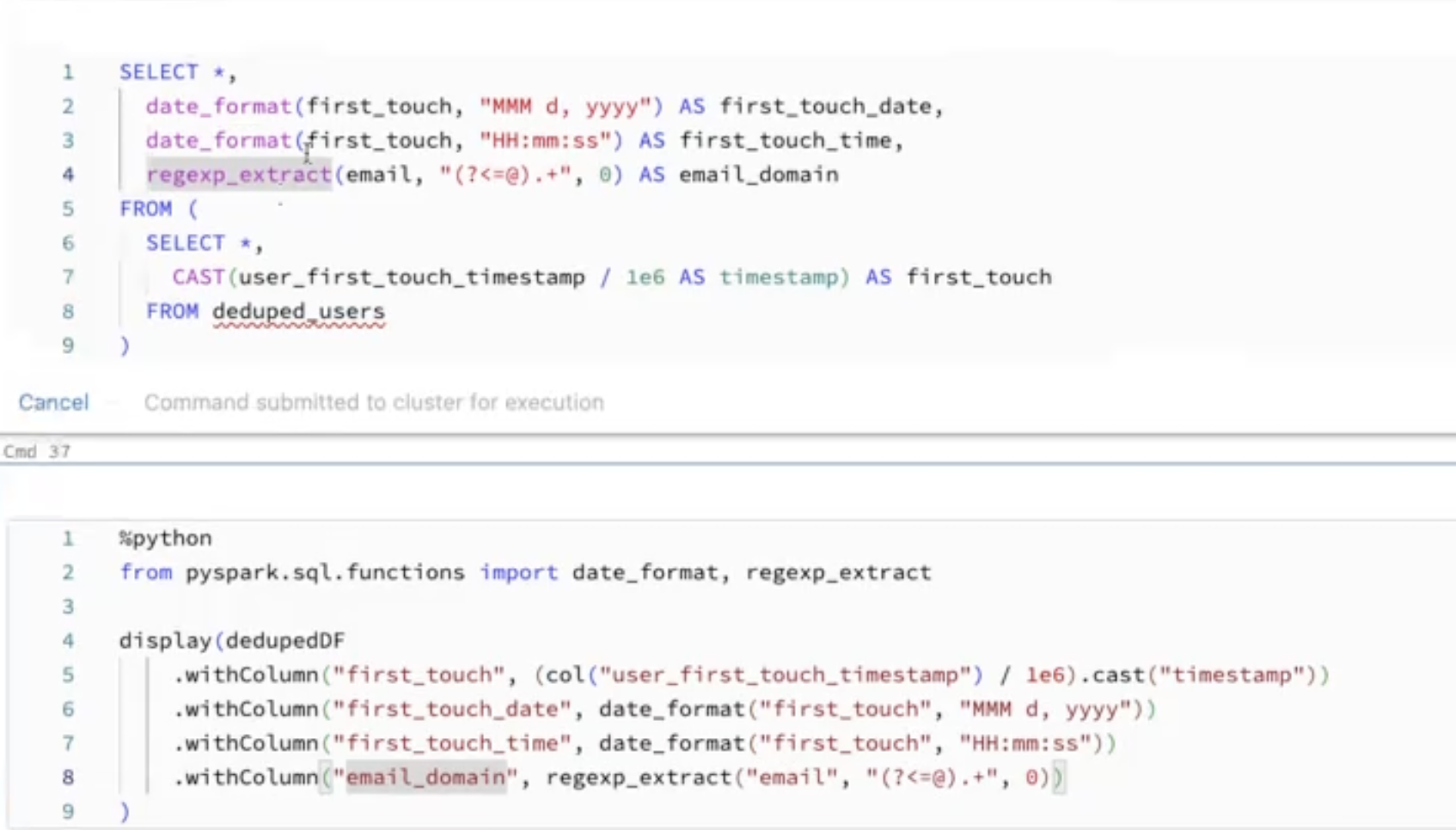
-
explodeturns one row per array into one row per element, so it can blow a table up fast. Select only the columns you need before exploding.
Day 3: Streaming
-
Auto Loader, the
cloudFilessource, is the Databricks way to ingest new files incrementally from a directory. It only picks up files it hasn’t seen before. -
For schema evolution, Auto Loader stores the schema it inferred in a schema location and tracks changes over time. But data that doesn’t match the schema doesn’t get thrown away. It goes into a
_rescued_datacolumn, so you can look at it later. -
cloudFiles.schemaHintslets you pin the type of a few columns and let Auto Loader infer the rest. -
Checkpoints are what make structured streaming restartable. Lose the checkpoint and the stream doesn’t know what it already processed.
-
A streaming pipeline should be fault tolerant, replayable, durable and idempotent.
-
You can treat a stream like a table in SQL by registering a temp view on it, and write the result back out with
writeStream. This is DE 6.3L in the course.(spark.readStream .table("bronze") .createOrReplaceTempView("streaming_tmp_vw"))SELECT device_id, count(device_id) AS total_recordings FROM streaming_tmp_vw GROUP BY device_idAnd this stops everything that’s still running in the notebook.
for s in spark.streams.active: s.stop() s.awaitTermination() -
Triggers control when the next micro-batch runs.
.trigger(once=True)processes everything available in one batch and stops, and because it keeps a checkpoint, the next run picks up where the last one left off. The course recommends.trigger(availableNow=True)instead, which does the same thing but in multiple batches, so a big backlog doesn’t land in one giant batch.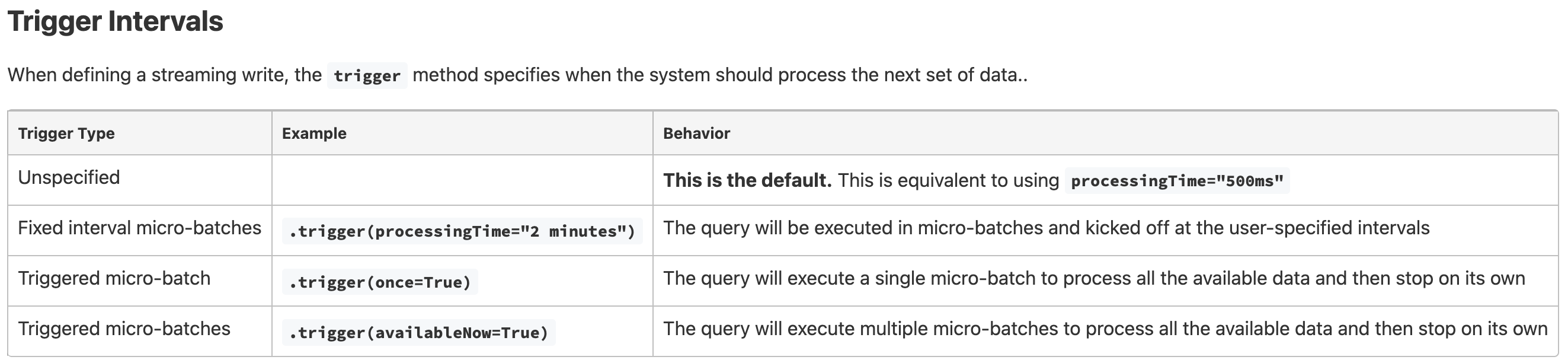
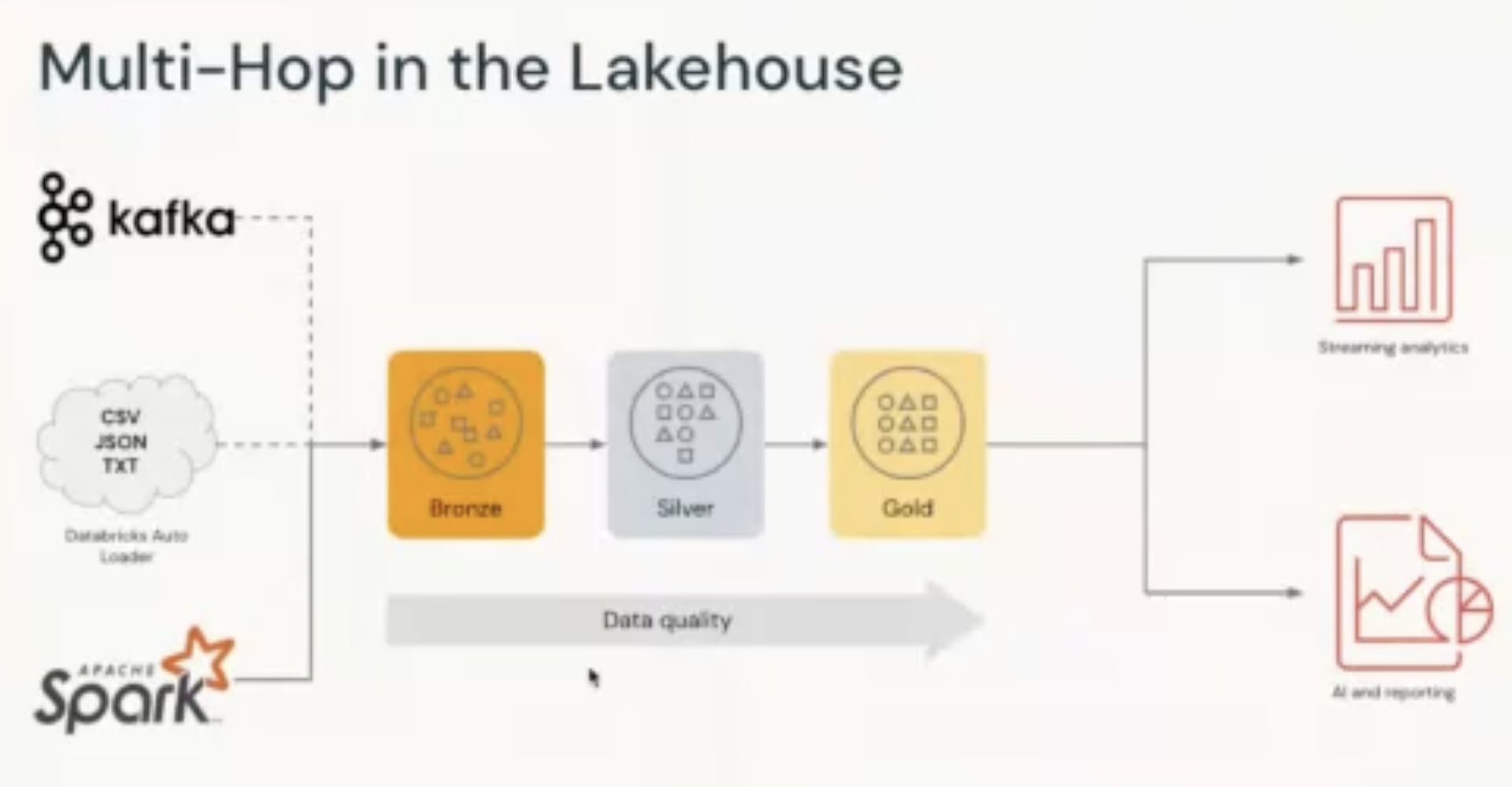
Multi-Hop Architecture
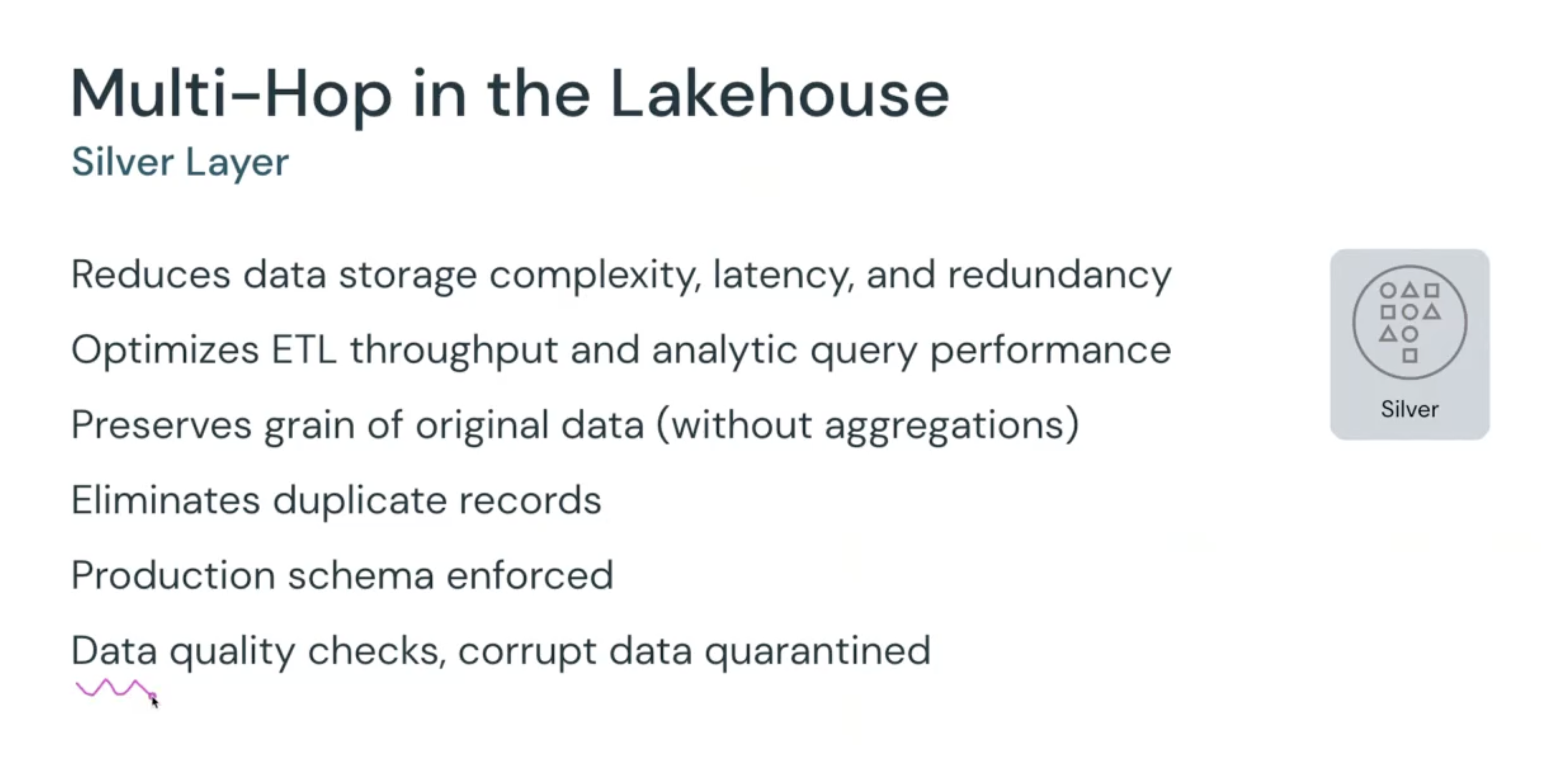
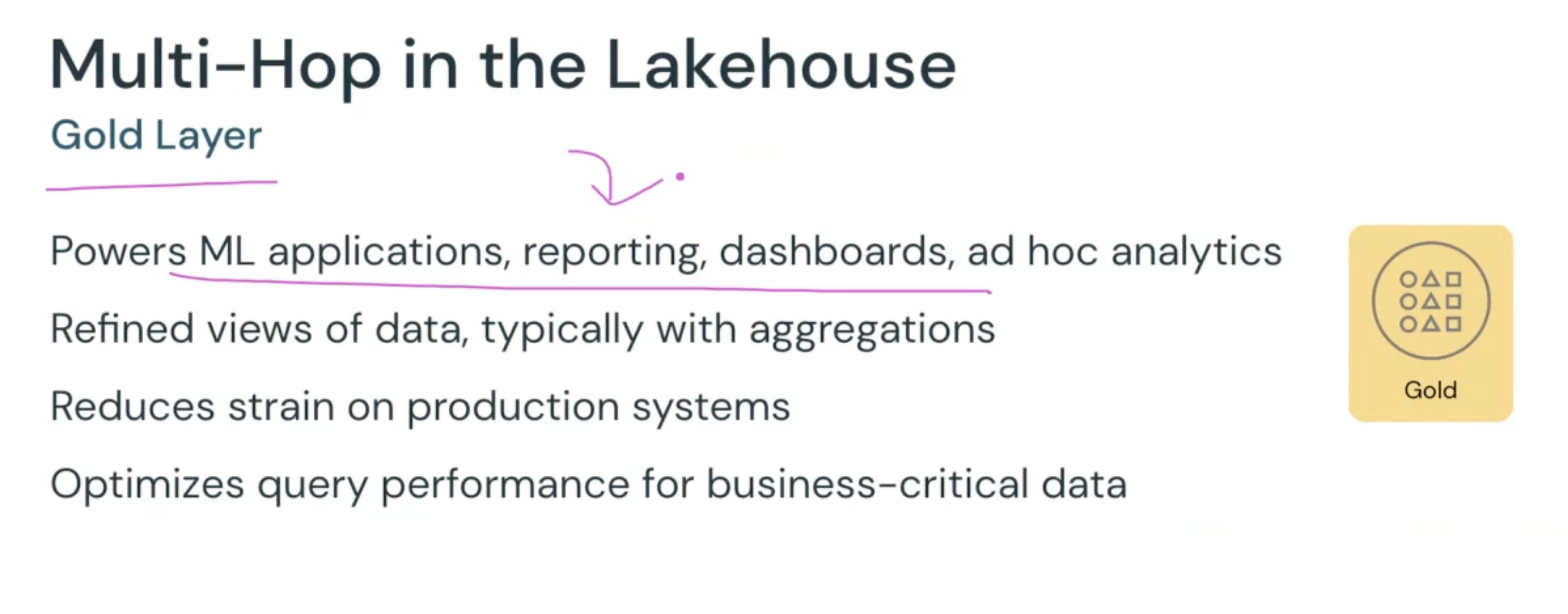
This is the bronze/silver/gold layout, which Databricks also calls the medallion architecture. Bronze is the raw data as it arrived, silver is cleaned, deduplicated and schema-enforced but still at the original grain, and gold is aggregated for dashboards, reports and ML.