2026-10-29T01:18:15.242Zhttps://hattajr.github.io/feed.xmlhattajrhattajr's Arts&CraftsMuhammad HattaGrill, Slice, Ship: How I Work With Agents2026-10-28T00:00:00+00:002026-10-28T00:00:00+00:00https://hattajr.github.io/2026/10/28/grill-slice-shipMuhammad Hatta
Grill, Slice, Ship: How I Work With Agents
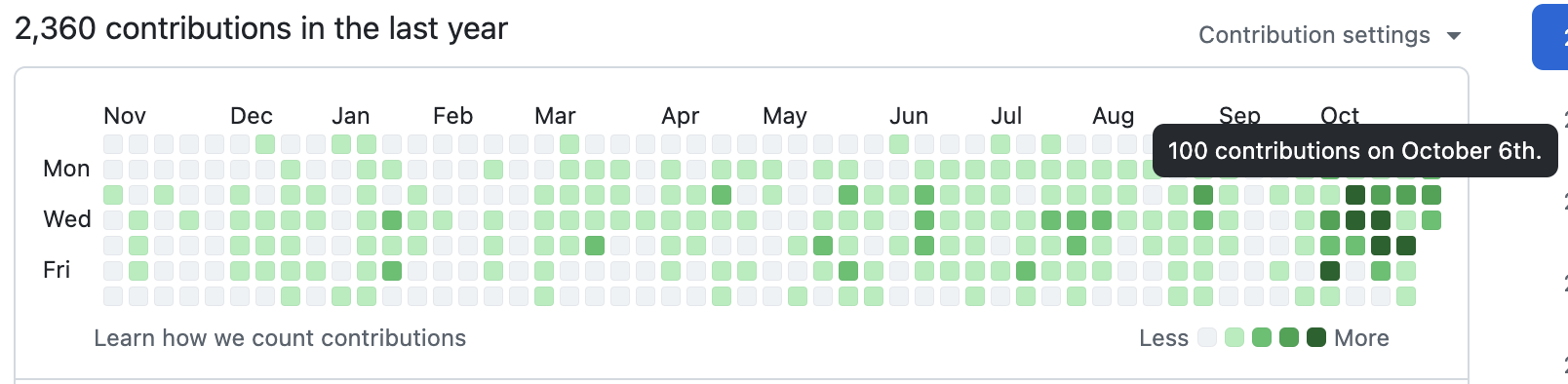
On an average day I merge somewhere between 20 and 60 pull requests now (on my busiest day so far, GitHub counted 100 contributions), and I write almost none of the code in those PRs myself. The surprising part for me isn’t the PR count. The surprising part is that the slow part of my day moved: implementation is fast, and nearly all of my time goes into planning before an agent is allowed to touch the codebase.
In case that sounds made up, here’s my GitHub contribution graph for the last year. The dark squares on the right are the busy days, and the tooltip is sitting on the busiest one: 100 contributions on October 6th.
This post walks through the workflow I ended up with. The setup is a handful of small skills (a skill is just a prompt the agent loads for one specific job) chained together, plus one main Claude Code session that orchestrates everything. To be clear, I’m not claiming this is the correct way to work with agents. This is the way that works for me right now, and I fully expect to keep tweaking it.
The process starts messy on purpose. I open a session and throw everything I have at the agent: what I want, why I want it, half-remembered links, decisions I’ve already made, things I’m unsure about, etc. I don’t try to write a specification at this stage because I don’t know the specification yet.
Then I ask the agent to grill me. My grill-me skill1 treats the plan as a tree of decisions, where each answer opens up the questions that depend on it. The interview happens in rounds. Each round contains all the questions the agent can ask without guessing at my other answers, with a recommended answer attached to each question. I answer, the agent recomputes the tree, and we repeat until no decision is left open.
The thing I do most in this phase is cut scope. I push toward the minimum in each round: what’s the smallest version of this application that’s still worth having? Which feature can wait for later? Agents are very happy to build every feature you mention, so if I don’t cut the scope here, nobody will.
This is the phase that takes the longest, and it should. The agent is good at finding gaps (an edge case I didn’t consider, two decisions that contradict each other, etc.), but deciding what to do about those gaps is my responsibility, and I can’t delegate that part. If I rush the grilling, I pay for it later in PRs that build the wrong thing very quickly.
A while ago I read a post about coding with AI that stuck with me. The gist: with AI it’s easy to get things right, but it’s just as easy to get them wrong, and a wrong decision doesn’t stay small. Everything downstream gets built on top of it, so by the time you notice, going back to the point where the decision was made costs a lot. And agents build on a bad decision just as fast as on a good one. That’s why I want the grilling and planning phase to be as thorough as I can make it. For a big project, the grilling alone sometimes takes days, or even weeks.
After the grilling, another skill, to-tickets, cuts the whole discussion into vertical slices.2
The common way to split work is by layer: one task for the database, one for the backend, one for the frontend, one for tests. That looks tidy, but each layer is waiting on the layer below. The frontend can’t start until the backend exists, and you can’t really test the backend until something calls the endpoints. So you end up with a chain of dependent tasks, and a chain doesn’t parallelize.
A vertical slice goes through all of the layers for one narrow piece of behavior. For example, say I’m building a bookmarks app. Instead of “all the tables, then all the endpoints, then all the pages”, the slices look like “a user can save a bookmark” (the table, the endpoint, the form and a test), then “a user can tag a bookmark”, then “a user can search their bookmarks”. The backend and frontend for a slice ship together because they’re one flow, so each slice is testable by itself, and most slices don’t block each other. If a slice really does depend on another slice, the dependency is written down explicitly instead of being hidden in the order of a list.
I create the repository first, then the slices get posted as GitHub issues. The idea turns into one parent issue, with each slice as a sub-issue under that parent and acceptance criteria and blockers linked. Any fully specified issue gets a ready-for-agent label, and that label is the gate: nothing gets implemented without the label.
I want to stress this part, because it’s the one I’d keep even if I threw out everything else: the GitHub issue is the record of every decision. What the grilling settled, the brief, the acceptance criteria, which run claimed it, the PR that implemented it, the follow-up somebody found during review, etc. It all lands on the issue body or in its comment history. So I don’t keep decision state anywhere else. No design docs folder, no DECISIONS.md, no notes file the agent has to be told about. An agent that picks up an issue (or comes back to it three PRs later) just reads the issue and has the whole story, and it can iterate from there.
The issues are the plan, and they’re also the memory. I’m not the first person to lean on GitHub issues this way, either. Simon Willison wrote about using them as his notebook in GitHub issues for notes: Markdown, links between issues across repos, search, and an API, all for free. It turns out those are exactly the features an agent needs too.
PRs hold context too (a bug the agent tripped over while building, a spot where it had to deviate from the brief, a review finding), but a PR is one attempt, and once it merges nobody goes back to it. One issue can also end up with more than one PR, so decisions spread across them would be hard to find. So the rule is simple: anything a PR finds that future work needs goes back to an issue. A changed decision goes into the original issue, and a new bug gets its own issue. Everything else on the PR is just evidence for the review.
The implement-issues skill looks for ready issues, picks a batch that’s safe to run together (up to three at a time), and claims those issues so two runs never grab the same work. Each issue gets built in a separate git worktree on a separate branch, so the agents don’t step on each other’s files, and the batch goes up as a PR. If I point the skill at a parent issue, the agent works through the children in waves ordered by their blockers. Each wave is merged before the next wave starts, so later slices build on what’s actually in main.
Merging is a separate skill too. merge-pr reviews the open PRs, runs the checks, merges the safe ones and cleans up the branches and worktrees afterward. If a PR needs a follow-up, the merge agent routes the follow-up back instead of quietly merging.
I only talk to the main session. The main session hands the work out to the other agents and brings the results back to me.
One might ask: how do 60 PRs a day not turn into 60 PRs of garbage? The answer is the harness, and I want to stress this one, because without it none of the above would work.
Tests are part of the harness, but only part. Every change also has to pass my code quality checks, such as linting, formatting and type checking, with zero errors before the agent is allowed to call the work done. And there’s a second layer that tells the agent how to build things: skills for the frameworks I use (FastAPI, HTMX, Alpine.js, Polars, etc.) that spell out my conventions, so the agent follows the way I build instead of making up its own way in each PR. The agents are fast, but the harness is what lets me trust that fast output enough to merge it.
One batch of three is nice, but I don’t want to come back and type “implement the next ones” after each merge. So the main session runs implement-issues inside /loop:
/loop /implement-issues
The /loop command just runs a prompt repeatedly. You can give it a fixed interval such as /loop 10m ..., or leave the interval off and let the agent decide how long to wait. On each run, the agent reads the open issues, finds the ready-for-agent issues with no open blockers, and implements the next safe batch. After a batch merges, the slices waiting on that batch are unblocked and the next run picks them up. If nothing is ready, the loop waits and checks again later.
Small ideas skip most of this process. Halfway through the day I’ll think of something like a button in the wrong place, and I just tell the main session. The triage skill decides whether the idea needs grilling or whether the change is small and clear enough to post as an issue right away. If the issue goes straight in, the next run of the loop builds the change, opens a PR and merges it without any further input from me.
Sometimes I’m not even at my desk when an idea shows up. In that case I grab my phone, open the GitHub app, and create an issue with just a title and a very short description. That’s it. Later I revisit those issues with triage, which fills in the brief, grills me if the idea needs it, and only then adds the ready-for-agent label. Until that happens the loop ignores the issue, so a half-baked idea from my phone never gets built by accident.
So my job is to keep the issue list full of well-grilled issues, and the loop’s job is to keep emptying the list. That’s the whole setup for now.
to-tickets and triage started as adaptations of Matt Pocock’s skills too, and the vertical-slice idea comes straight from there. I didn’t come up with it.↩︎
]]>
Watching My Heart Beat2026-08-28T00:00:00+00:002026-08-28T00:00:00+00:00https://hattajr.github.io/2026/08/28/ecg-live-heartbeatMuhammad Hatta
Watching My Heart Beat
At Wellysis, where I work, one of our products is an FDA-cleared single-lead ECG device. So I thought, why not use it to animate my own heartbeat? You’ve seen those pulsing heart animations that just loop on a timer. This is that kind of thing, but every beat comes from a real recording, so it’s a lot more precise. I wore it for a whole day, logged what I was doing in the app’s diary as I went, and then used the diary to cut out one-minute samples from four different moments. The animation plays along with those.
Click Start to play all four. Each row is one 60-second recording, and the heart next to it beats in time with that trace. Peacefully sleeping, my heart was at ~59 BPM, fully caffeinated and technically working at ~75 BPM, a 50 m run to make the zebra crossing at ~140 BPM, and playing Dota 2 on the SEA server at ~127 BPM.
Yes, a game of DOTA 2 in SEA server gets my heart to ~127 BPM, only ~13 BPM less than actually sprinting. If you’ve ever played DOTA 2 on SEA, you already know why.
The heart is timed by a small QRS detector that runs in your browser. It finds the R peaks in the trace and schedules every contraction off them, so a faster heart rate makes the animation pump faster too.
To be clear, this is a toy and not a clinical analysis. If you actually want to know how your heart is doing, that’s the job of the real analysis and a cardiologist. A single ECG lead also can’t tell you valve timing or blood flow, so those parts of the animation are an educated guess built on top of the beat timing.
]]>
From 1.7s to 75ms: How Small Changes Sped Up Our Deltalake Reads2026-06-10T00:00:00+00:002026-06-10T00:00:00+00:00https://hattajr.github.io/2026/06/10/improve-read-deltatable-polarsMuhammad Hatta
From 1.7s to 75ms: How Small Changes Sped Up Our Deltalake Reads
Reading a 16 TB Delta Lake table with Polars, and what made it 23× faster.
Update, 2026-06-12: I published this thinking the speedup was all in the code, but I never actually checked whether MinIO’s OS page cache or the disk layout was doing the real work. The same storage does ~14 seconds cold, and those “fast” numbers might just be warm cache hits on two over-full spindles. I’ll write the full storage autopsy as a separate post – treat these benchmarks as optimistic until then.
We read the same Delta Lake table over and over: a training loop pulling batches to feed a model, and a FastAPI route serving one series per request. The data lives on S3, about 16 TB of it, spread across 56,827 files, roughly 200 million rows, partitioned by series. The query is dull. We filter to one series (a uid) and hand back 500 rows. The obvious way to write it:
Each call took 1700 milliseconds. That’s fine if you run it once. But we don’t run it once: we run it in a loop, thousands of times, and 1700 milliseconds per pull turns a batch job or a request handler into something that crawls.
The reason is in the call itself. We pass scan_delta a path, and a path means “go figure out the current state of this table from scratch.” Every iteration rescans the Delta path: it re-reads the transaction log from S3 and re-enumerates all 56,827 files, before it touches a single row we actually asked for. We were rebuilding the entire scan from the path on every pass through the loop.
Rather than assume S3 is just slow, we measured where the 1700 milliseconds actually went.
Almost none of it was the query. Of the 1700 milliseconds, about 1100 milliseconds was Delta re-reading and replaying its transaction log from S3. About 260 milliseconds more was enumerating all 56,827 files to build the query plan. Around 300 milliseconds was reading the actual columns, most of which we didn’t even want. The query itself was about 75 milliseconds.
So 95% of the time was setup, and the setup was identical every time. The transaction log doesn’t change between two requests a second apart, and neither does the file list. We were deriving the same facts on every call, throwing them away, and deriving them again.
There were three redundant pieces, and we removed them one at a time.
The first is the log replay, the cost of passing a path. Load the table once and pass the loaded object around instead, and the log gets read a single time in the life of the process rather than once per query. That’s the 1100 milliseconds gone.
The second is the file enumeration. Even with the table loaded, building the scan walks all 56,827 files to decide what the plan looks like. But that walk produces the same answer every time too, so you do it once: build the scanner once, and per request only change the filter and collect.
from deltalake import DeltaTableimport polars as pl# 1. Load the snapshot once: one transaction-log read# from S3, for the whole process.dt = DeltaTable(delta_path, storage_options=storage_options)# 2. Freeze the scan once: file enumeration happens here,# and the file list is baked into this LazyFrame.# Project only the columns you need while you're at it.base_lf = pl.scan_delta(dt).select("uid", "partition_key_int", "start_time")# 3. Loop: per iteration only swap the filter and collect.# No re-read, no re-enumerate.for uid in uids: df = ( base_lf.filter(pl.col("uid") == uid) .head(500) .collect() # ~75 ms each ) ...
The third is reading columns you’re not going to return. This is projection pushdown: when you .select() only the columns you need, Polars pushes that projection down into the Parquet reader so the wide columns are never fetched from S3 at all. Our wide signal columns are thousands of times larger than the scalar ones, and for these queries we don’t want them, so the pushdown drops nearly all the payload bytes. On the raw scan_delta(path) it looked negligible; it shaved under a fifth off a number the log read already dominated, so it’s easy to dismiss. But the log read was masking it. Once the log read and the enumeration are gone, projection is the largest lever left: it takes the reused read from ~380 milliseconds down to ~75, about 5×.
Removing them in order, the cost drops each time. Measured against the live table, same query, warm process:
Change
What it removes
Time per query
Starting point: scan_delta(path), all columns, on every call
nothing yet
~1750 milliseconds
Reuse the loaded snapshot (pass the DeltaTable)
log replay, ~1100 milliseconds
~640 milliseconds
Reuse the built scan (build once, swap the filter)
file enumeration, ~260 milliseconds
~380 milliseconds
Project only the scalar columns
wide column bytes, ~305 milliseconds
~75 milliseconds floor
(Means over repeated warm reads against the live table; S3 latency varies run to run, so treat these as representative, not exact.)
For contrast, once you’re projecting the scalar columns, rebuilding the scan on every call sits steady at ~300 milliseconds while build-once holds at ~75: that ~225 milliseconds gap is the file-enumeration tax over 56,827 files, paid again and again.
A few things surprised us.
Asking for fewer rows doesn’t help. head(1) costs the same as head(500). The floor is per-file and per-column, not per-row, so once you’ve paid to open the right file the rows are nearly free.
Better partition pruning doesn’t help either, which was the counterintuitive one. Our first instinct was to prune harder. But we were already pruning perfectly, 1 file out of 56,827, and pruning happens after the log is replayed, so no amount of it can shrink the thing that was actually slow.
And the 75 milliseconds doesn’t depend on which query you run. Different series, different filter shapes, they all land around 75 milliseconds, because the expensive work is the setup and the setup is the same regardless. That’s what makes the whole thing safe to build a service on.
This points at how you actually serve it, and at the one condition the whole approach depends on: it only works if the process stays alive and reuses the snapshot across many requests. We query the Delta table directly from Polars inside a long-lived FastAPI service, and the trick is where the setup happens: once, at startup, instead of once per request.
Call this from a one-off script that loads the table, runs a single query, and exits, and none of it helps. That script pays the full ~1700 milliseconds every time, because there is no second request to amortize the setup over. The 75 milliseconds is what every request after the first one costs. The build-once pattern only earns its keep inside something that serves request after request off the same loaded state.
In FastAPI that “something” is the running server and its event loop. The snapshot and the built scan get created in the lifespan, stored on app.state, and shared by every request that follows:
@asynccontextmanagerasyncdeflifespan(app: FastAPI): table = isiji.deltatable.Merged256()# loads the Delta snapshot once app.state.delta = DeltaSource(table.dtb)# reuse it, no second log readyieldapp = FastAPI(lifespan=lifespan)@app.get("/rows/{uid}")asyncdefget_rows( uid: str, request: Request, limit: int = 500) -> Response: df = await request.app.state.delta.fetch(uid, limit)return Response( content=df.write_json(), media_type="application/json", )
DeltaSource is just the build-once idea wrapped in an object. It holds the loaded DeltaTable and the one scan built from it, and every request swaps in its filter:
classDeltaSource:def__init__(self, table: DeltaTable) -> None: self._table = table# loaded snapshot, kept for the app's life self._base_lf = self._build_lazyframe()# the scan, built once self._refreshed_at = time.monotonic() self._lock = asyncio.Lock()def_build_lazyframe(self) -> pl.LazyFrame:return pl.scan_delta(self._table).select(SCALAR_COLUMNS)asyncdeffetch(self, uid: str, limit: int) -> pl.DataFrame:await self._refresh_if_stale() lf = self._base_lf# capture before collecting, survives a swapreturnawait asyncio.to_thread(lambda: lf.filter( pl.col("uid") == uid ).head(limit).collect() )
There are a few details to get right. The S3 calls and the .collect() are blocking, so they run in asyncio.to_thread to stay off the event loop. We tested it with 200 concurrent requests and a refresh fired in the middle, and got 200 correct answers and no crashes. End to end, a real request now comes back in about 104 milliseconds: the 75 milliseconds of query plus FastAPI and JSON on top.
There’s one honest catch, and it’s the price of the whole approach. State you build once is frozen in time. It won’t see data written after you built it. So you trade a little freshness for the speed, and you pay it back on a timer. Delta makes the refresh cheap: update_incremental() reads only the new commits instead of replaying the whole log, and then you rebuild the scan so the new file list is actually picked up:
def_refresh_blocking(self) -> pl.LazyFrame: self._table.update_incremental()# read only new commits, not the whole logreturn self._build_lazyframe()# rebuild so the new files are seenasyncdef_refresh_if_stale(self) -> None:if time.monotonic() - self._refreshed_at < TTL_SECONDS:returnasyncwith self._lock:# only one request rebuildsif time.monotonic() - self._refreshed_at < TTL_SECONDS:return# double-check after waiting for the lock new_lf = await asyncio.to_thread( self._refresh_blocking ) self._base_lf = new_lf# atomic rebind; readers see the# old one until here self._refreshed_at = time.monotonic()
Two things make that safe under load. Only one request rebuilds when the window expires, because the rest wait on the lock and then find the work already done. And the swap is a single assignment, so an in-flight query either sees the old scan or the new one, never a half-built one. The freshness window is a number you choose on purpose: ours is a day, because the source refreshes on a daily schedule and there’s no point paying for a refresh more often than the data changes.
That’s the whole change. Load the snapshot once, build the scan once, project only the columns you need, and per request swap only the filter. The magnitudes are specific to this table and scale with file count, but the pattern holds anywhere you read Delta from a long-lived process: 1700 milliseconds down to 75 milliseconds, with no faster hardware and no change to the data.
]]>
MinIO Disk Partitions and a Wrong Hypothesis2024-07-02T00:00:00+00:002024-07-02T00:00:00+00:00https://hattajr.github.io/2024/07/02/create-xfs-disk-partition-linuxMuhammad Hatta
MinIO Disk Partitions and a Wrong Hypothesis
I once split the single HDD in my MinIO server into four XFS partitions so MinIO would see four drives, and it made MinIO slower. The setup itself is still correct if you have more than one physical disk, so I’m keeping the steps here, along with why this backfired so badly on a single disk.
The idea seemed reasonable at the time. MinIO wants XFS and one mount point per drive, and it spreads work across every drive it has, so I figured that if I gave MinIO four “drives” instead of one, it would read and write four times in parallel and I’d get four times the throughput for free.
Warning: everything below wipes the target disk, so double-check the device name before you write anything.
First, find the disk. I prefer lsblk over fdisk -l because this shows the tree of disks, partitions, mount points, etc. at a glance. You’re looking for the drive with no mount points, such as /dev/sdb, which I’ll call /dev/sdX below.
lsblksudo fdisk -l /dev/sdX
Then create the partitions with fdisk.
sudo fdisk /dev/sdX
Inside fdisk, press g first to make a GPT partition table. The older MBR table only allows 4 primary partitions and can’t address more than 2 TiB, and any HDD you’d buy for object storage today is bigger than that. Then for each partition press n, Enter for the default number, Enter for the default first sector, and type a size such as +500G for the last sector. Press w at the end to write the table and exit.
Next, format every partition as XFS and give each one a label. The label is what we’ll mount by later, and XFS caps labels at 12 characters, so keep them short.
for i in {1..4}; do sudo mkfs.xfs -f -L MINIODISK$i /dev/sdX$idone
Note the range is {1..4} with two dots. I had three in my own notes at first, and bash doesn’t expand that at all, it just passes along the literal path /dev/sdX{1...4}.
sudo mkdir -p /mnt/minio/disk{1..4}for i in {1..4}; do sudo mount LABEL=MINIODISK$i /mnt/minio/disk$idone
To survive a reboot, the mounts go in /etc/fstab. Don’t use /dev/sdX1 there, because device names can shuffle between boots if you add or remove a disk, and then the wrong disk shows up at the wrong path. MinIO’s docs recommend mounting by label over UUID, because if a disk dies, you format the replacement with the same label and fstab doesn’t change.1
noatime stops the kernel from writing an access timestamp on every read, which MinIO has no use for.
Finally, test it before you reboot. Stop MinIO first, otherwise umount fails because the mounts are busy and mount -a has nothing to test. If mount -a complains, fix it now, because a broken fstab entry can drop the machine into emergency mode on the next boot and that’s a much worse time to find out.
sudo umount /mnt/minio/disk{1..4}sudo mount -adf -h | grep minio
So all of this works, and then MinIO got slower. I did benchmark it, but I didn’t keep the numbers around. The one I do remember is the job reading from MinIO: about 10 minutes with the disk as a single partition, and about 17 with four.
The reason is mechanical. An HDD has a read/write head for each platter surface, but every head is mounted on a single actuator (a stack of arms that pivots together), so the heads can’t go to different places at the same time. To read anything, the whole actuator swings to the right track and then waits for the platter to spin the right sector underneath it, and on a 7200 RPM drive that costs several milliseconds every time. Some enterprise drives (Seagate’s MACH.2, for example) have two independent actuators, and those show up to the OS as two separate devices.2 My drive wasn’t.
MinIO, of course, has no idea. It sees four mounts and treats them as four independent drives. Its erasure coding splits every object into data and parity shards and puts one shard on each drive in the set, so a single write became four writes to four different regions of the same platters. A big file the disk could have streamed in a single sequential pass turned into the actuator bouncing between partitions, and seeking is the thing an HDD is worst at.
It also didn’t buy me any safety. Erasure coding exists so you can lose a drive, but four partitions on the same disk die together.
What I’d do now is simple. With a single HDD, give MinIO the whole disk as a single XFS mount and accept that it has no redundancy beyond the disk itself (MinIO supports that single-drive setup fine). If you want speed or redundancy, buy more physical disks and use the steps above with one partition per disk. Labels have to be unique across every attached disk, so name them per disk (MINIODISK1 on the first disk, MINIODISK2 on the second, etc.). And if you’re on SSD or NVMe, there are no moving heads, parallel requests are cheap, and MinIO recommends flash anyway, but partitioning a single SSD still gets you zero redundancy.
MinIO’s own deployment docs use exactly this LABEL=... defaults,noatime style in their fstab example.↩︎
Tom’s Hardware has a good write-up on MACH.2 if you’re curious how that works.↩︎
]]>
Querying Deltalake From Apache Superset Dashboard2023-09-20T00:00:00+00:002023-09-20T00:00:00+00:00https://hattajr.github.io/2023/09/20/superset-deltalakeMuhammad Hatta
Querying Deltalake From Apache Superset Dashboard
We run our own Delta lakehouse on MinIO, and we’d just finished migrating terabytes of data into it. Every night a pipeline runs the aggregations and writes the results back into the lakehouse as more Delta tables. Which is great, until someone asks to see those numbers on a dashboard.
That’s where I got stuck. Grafana was the obvious first stop, but it has no way to read a Delta table, so I went looking and found Apache Superset. Superset can’t read Delta directly either, but it’s Python all the way down and lets you hook your own code into a query, so I forked it and added a small trick to make it work.
DuckDB can read plain Parquet over HTTP, though, and a Delta table is mostly just Parquet files plus a transaction log saying which of those files are currently part of the table. So the plan was to let the deltalake Python package read the log, turn the active files into presigned MinIO URLs, and hand that list to DuckDB inside a Superset SQL query.
The glue is Superset’s Jinja templating. Superset lets you register Python functions in JINJA_CONTEXT_ADDONS, and then you can call them from SQL Lab with {{ ... }}. Whatever the function returns gets rendered into the query text before it’s sent to the database.
This assumes the Docker Compose setup from the Superset repo. Superset needs a few extra packages: duckdb-engine so it can talk to DuckDB at all, deltalake to read the Delta log, minio to presign the URLs, and python-dotenv for the credentials. In the Docker setup, extra packages go in docker/requirements-local.txt, and then you rebuild the stack.
duckdb-enginedeltalakeminiopython-dotenv
Next, put the MinIO credentials in a .env file next to the config (docker/pythonpath_dev/.env).
Then the config itself. I originally edited superset_config.py directly, but the Superset Docker docs say to put local overrides in docker/pythonpath_dev/superset_config_docker.py (it’s git-ignored and gets loaded on top), so that’s where this goes.
from datetime import timedeltafrom pathlib import Pathfrom deltalake import DeltaTablefrom dotenv import dotenv_valuesfrom minio import MinioREQUIRED_KEYS = ("AWS_ACCESS_KEY_ID","AWS_SECRET_ACCESS_KEY","AWS_ENDPOINT_URL",)defload_minio_env() -> dict[str, str]:"""Read MinIO credentials from the .env next to this file.""" env = dotenv_values(Path(__file__).with_name(".env")) missing = [key for key in REQUIRED_KEYS ifnot env.get(key)]if missing:raise ValueError(f"missing in .env: {missing}")return {k: v for k, v in env.items() if v isnotNone}defdelta_table(bucket: str, table_path: str) -> list[str]:"""Return presigned URLs for the active files of a Delta table.""" env = load_minio_env() table = DeltaTable(f"s3://{bucket}/{table_path}", storage_options={"AWS_ACCESS_KEY_ID": env["AWS_ACCESS_KEY_ID"],"AWS_SECRET_ACCESS_KEY": env["AWS_SECRET_ACCESS_KEY"],"AWS_ENDPOINT_URL": env["AWS_ENDPOINT_URL"],"AWS_REGION": env.get("AWS_REGION", "us-east-1"),"AWS_ALLOW_HTTP": "true", }, )# The MinIO client wants host:port, not a URL. endpoint = env["AWS_ENDPOINT_URL"].split("//", 1)[1] client = Minio( endpoint, access_key=env["AWS_ACCESS_KEY_ID"], secret_key=env["AWS_SECRET_ACCESS_KEY"], secure=False, ) prefix = f"s3://{bucket}/"return [ client.presigned_get_object( bucket, uri.removeprefix(prefix), expires=timedelta(days=1), )for uri in table.file_uris() ]FEATURE_FLAGS = {"ENABLE_TEMPLATE_PROCESSING": True}JINJA_CONTEXT_ADDONS = {"delta_table": delta_table}
Two things here are easy to miss. First, Jinja does nothing until the ENABLE_TEMPLATE_PROCESSING feature flag is on. Without it the {{ ... }} just goes to the database as literal text. (If you already set other FEATURE_FLAGS, add it to that dict rather than replacing it.) Second, the storage_options keys. The delta-rs docs use AWS_ALLOW_HTTP for a MinIO that serves plain HTTP, which is what you get from a default local MinIO on port 9000. That’s also why the MinIO client has secure=False. If your MinIO sits behind HTTPS, flip it to True.
Finally, add a database in Superset with the SQLAlchemy URI duckdb:///:memory:. DuckDB doesn’t need to store anything here, it only reads the Parquet files on each query.
The reason this works at all is kind of lucky. delta_table returns a Python list of strings, and Jinja renders the list with Python’s own formatting, ['http://...', 'http://...']. That happens to be valid DuckDB list syntax, and read_parquet accepts a list of files.
This is a hack, and DuckDB only ever sees Parquet files. So you lose anything that lives only in the Delta log, such as these three I know about.
Deletion vectors. Rows that were soft-deleted are still in the Parquet files, so they come back.
Partition columns. Delta stores partition values in the log and usually not in the data files, so those columns are missing from read_parquet unless you recover them from the file paths.
Column mapping. If the table renamed columns using column mapping, you get the physical column names.
Also be careful who can use this. delta_table takes the bucket and path straight from the SQL, so anyone with SQL Lab access can presign any file the MinIO credentials can read, and those URLs end up in the query history. Give Superset a MinIO user that can only read the tables you actually want on dashboards.
The presigned URLs also expire after one day, which is fine for SQL Lab since the function runs on every query, but every query also re-reads the Delta log and presigns every active file. The whole lakehouse is multiple terabytes spread over millions of files, so pointing this at a raw table would be hopeless, since every one of those URLs ends up pasted into the SQL text. The dashboards only read the nightly aggregate tables, though, and those charts took 5 to 10 seconds to load. Not fast, but fine for numbers that change once a day.
]]>
Notes From a Databricks Delta Lake Training2023-04-18T00:00:00+00:002023-04-18T00:00:00+00:00https://hattajr.github.io/2023/04/18/databricks-webinarMuhammad Hatta
Notes From a Databricks Delta Lake Training
These are my notes from a three-day Databricks training on Delta Lake and Spark, cleaned up a bit so they make sense to someone other than me. The organizers said up front that the recording and slides would not be shared, so if you want the full course, search Databricks Academy for the self-paced “Data Engineer Learning Plan”. The notebooks are also public in the databricks-academy repo on GitHub.
We run Delta Lake ourselves on MinIO rather than on Databricks, so I’m mostly interested in the parts that are plain Spark and Delta. But I kept the Databricks-only bits too, since this is my record of the course.
Embrace spark.sql(...). A lot of the course is written in SQL, and anything you can do with the DataFrame API you can usually also do in SQL against the same tables. Both end up as the same query plan, so this is mostly about which one reads better.
The Hive metastore is where table definitions live, meaning the name, the schema, the location of the files, etc. Databricks is pushing Unity Catalog for this now, but the idea is the same.
Delta tables are either managed or external. Drop a managed table and both the metadata and the Parquet files are deleted. Drop an external table, which is one created with a LOCATION, and only the metadata goes away. The files stay where they are.
DESCRIBE DETAIL gives you the Delta-specific stuff such as format, location, number of files and size, and DESCRIBE EXTENDED adds the storage location, provider and table properties under the schema.
CREATE SCHEMA IF NOT EXISTS ${da.schema_name} creates a schema, which is a database, not a table. I wrote down “what’s the difference with DeltaTable.createIfNotExists?” during the session, and the answer is that they aren’t the same thing at all. DeltaTable.createIfNotExists is the Python builder for a table, so its SQL twin is CREATE TABLE IF NOT EXISTS.
Define the schema when you create the table. Letting Spark guess it works for a demo, but this is where type surprises come from later.
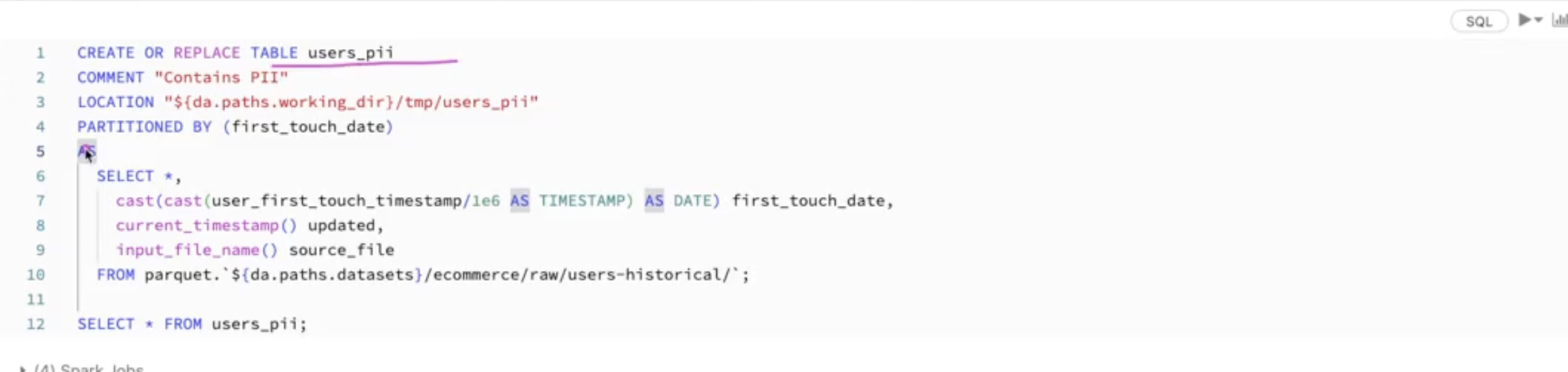
CTAS (CREATE TABLE ... AS SELECT) infers the schema from the query and doesn’t let you pass file options. For something like CSV with a header and a custom delimiter, the course first creates a temp view with USING CSV OPTIONS (...). Then it does the CTAS from that view. See the course notebook.
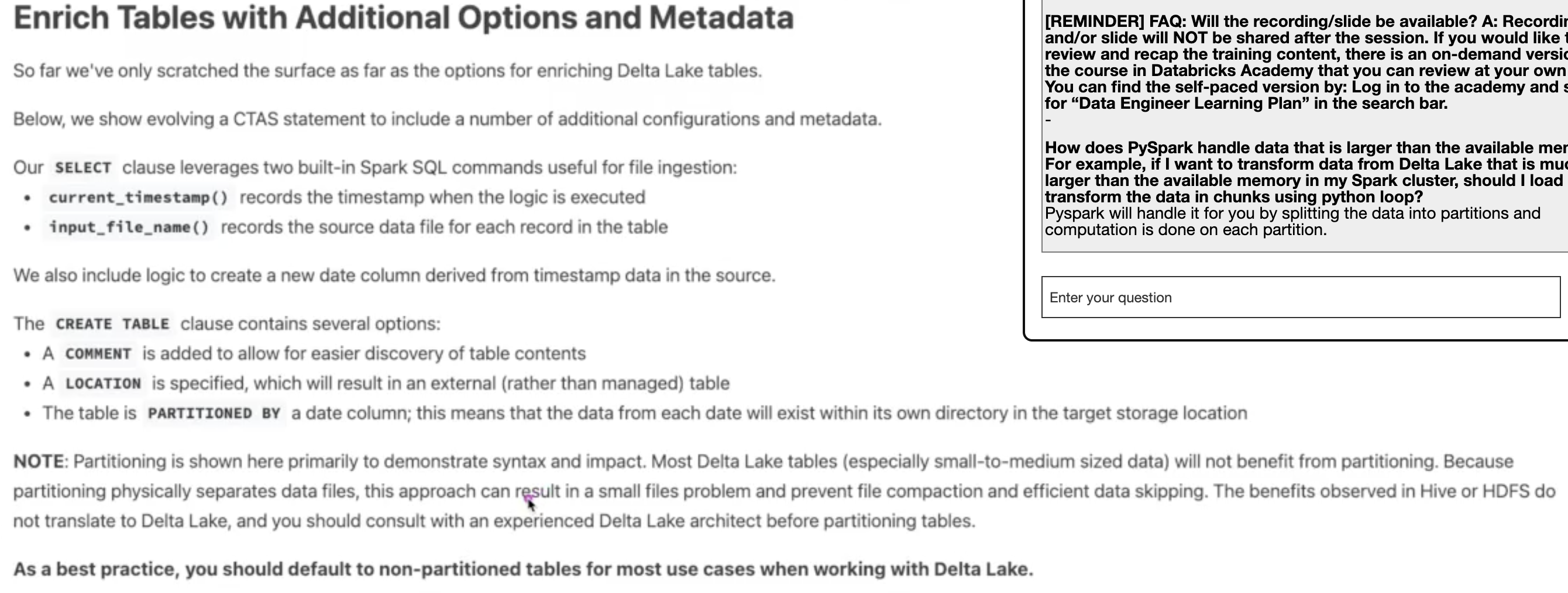
You can enrich a table at creation time with a COMMENT, a LOCATION, and extra columns. current_timestamp() records when the row was loaded and input_file_name() records which source file it came from. Both are also in pyspark.sql.functions.
As a best practice, don’t partition small Delta tables. The course’s own wording is that most small-to-medium Delta tables won’t benefit from partitioning, because it splits the data into lots of small files and gets in the way of compaction and data skipping. Default to non-partitioned.
SHALLOW CLONE copies only the Delta log and still points at the source table’s files, so it’s cheap and good for testing against real data. DEEP CLONE copies the files too.
Avoid the RDD API. The DataFrame and SQL APIs go through Spark’s query optimizer and RDDs don’t.
df.schema gives you the schema as an object, and you can reuse it to create another table with the same shape.
df.collect() pulls all the data from every executor onto the driver. Fine for 10 rows, a crash for 10 billion.
df.createOrReplaceTempView("name") lets you query a DataFrame with SQL. It’s easy to think this creates a temporary table in memory, but it doesn’t. It’s just a name for the DataFrame’s query plan, scoped to the Spark session. Nothing is computed or cached until you query it.
DataFrames are immutable, so every transformation returns a new DataFrame and leaves the old one alone.
count(*) counts every row, and count(col) skips rows where col is null.
Use . to reach into nested struct fields, as in SELECT user.address.city.
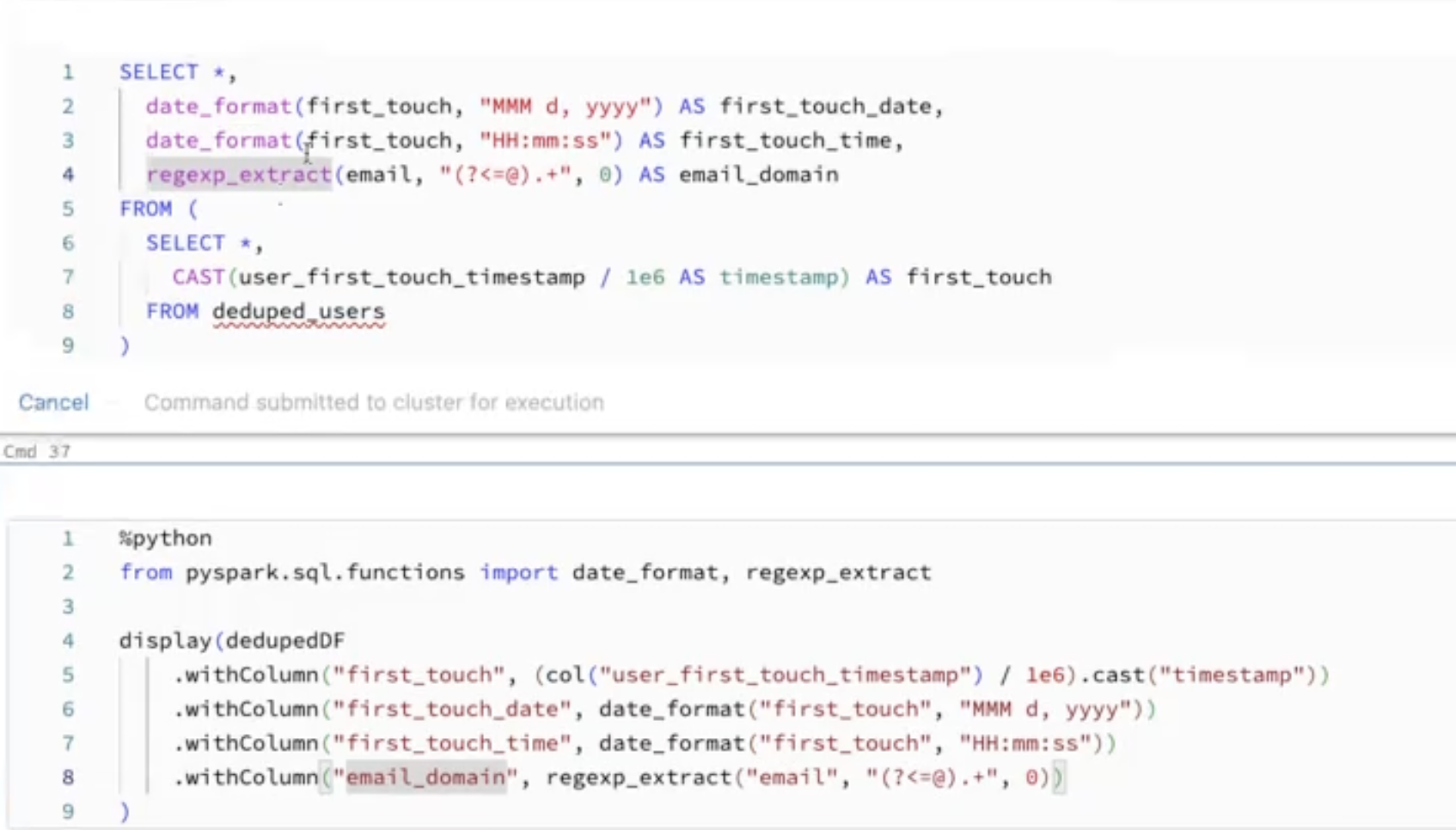
Here’s the course’s example of the timestamp and string helpers, in SQL and PySpark. The / 1e6 is there because user_first_touch_timestamp is in microseconds.
explode turns one row per array into one row per element, so it can blow a table up fast. Select only the columns you need before exploding.
Auto Loader, the cloudFiles source, is the Databricks way to ingest new files incrementally from a directory. It only picks up files it hasn’t seen before.
For schema evolution, Auto Loader stores the schema it inferred in a schema location and tracks changes over time. But data that doesn’t match the schema doesn’t get thrown away. It goes into a _rescued_data column, so you can look at it later.
cloudFiles.schemaHints lets you pin the type of a few columns and let Auto Loader infer the rest.
Checkpoints are what make structured streaming restartable. Lose the checkpoint and the stream doesn’t know what it already processed.
A streaming pipeline should be fault tolerant, replayable, durable and idempotent.
You can treat a stream like a table in SQL by registering a temp view on it, and write the result back out with writeStream. This is DE 6.3L in the course.
SELECT device_id, count(device_id) AS total_recordingsFROM streaming_tmp_vwGROUPBY device_id
And this stops everything that’s still running in the notebook.
for s in spark.streams.active:
    s.stop()
    s.awaitTermination()
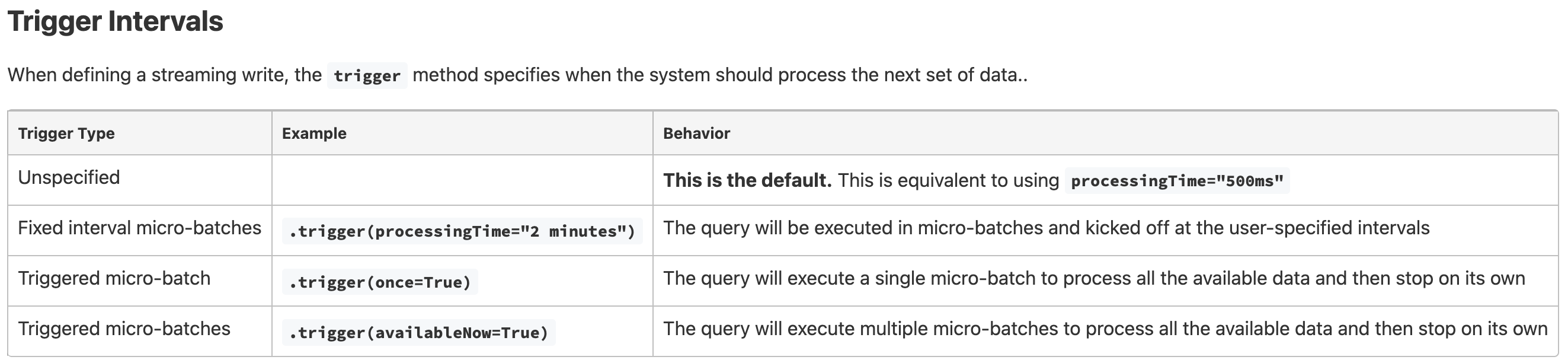
Triggers control when the next micro-batch runs. .trigger(once=True) processes everything available in one batch and stops, and because it keeps a checkpoint, the next run picks up where the last one left off. The course recommends .trigger(availableNow=True) instead, which does the same thing but in multiple batches, so a big backlog doesn’t land in one giant batch.
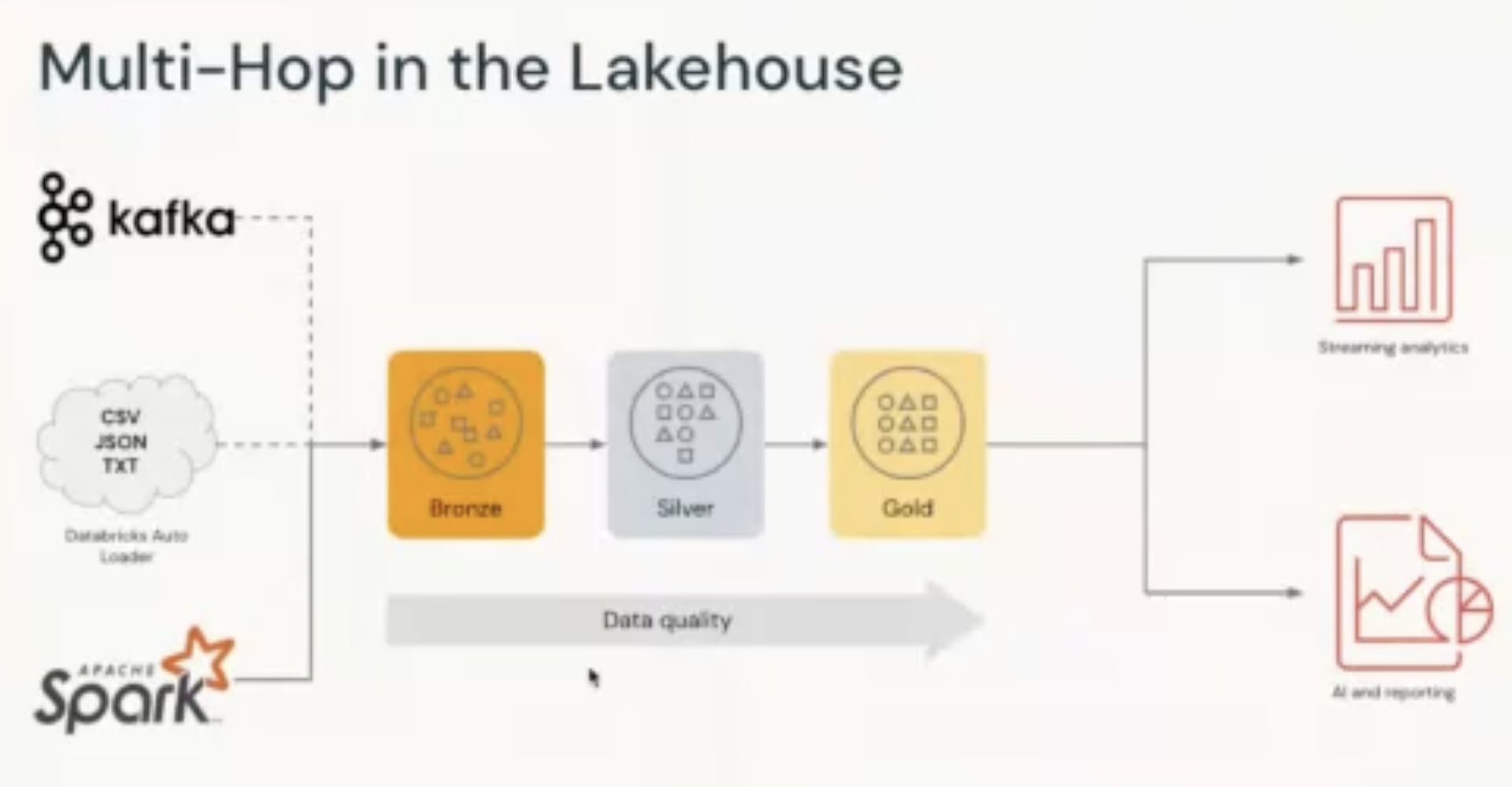
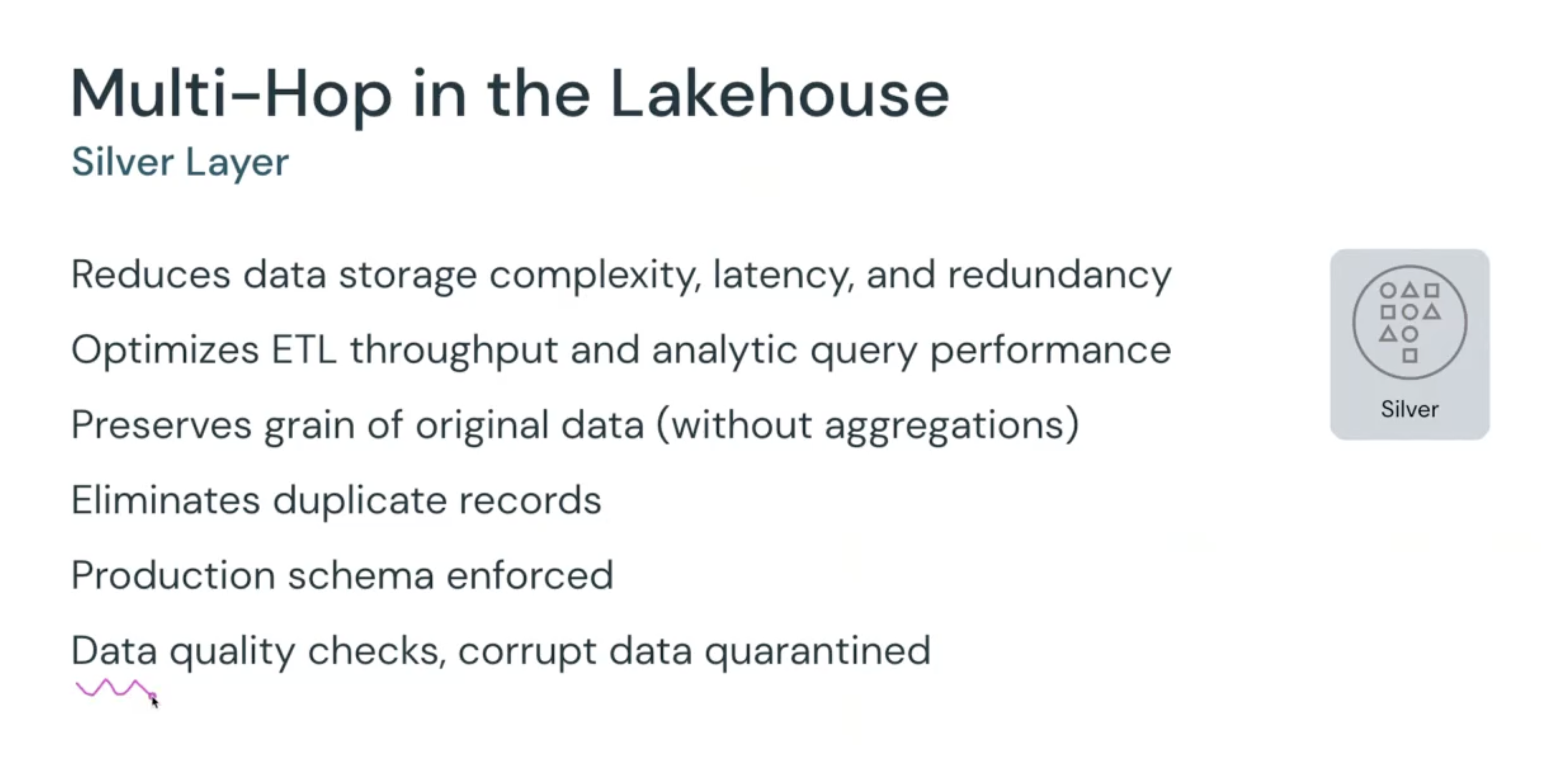
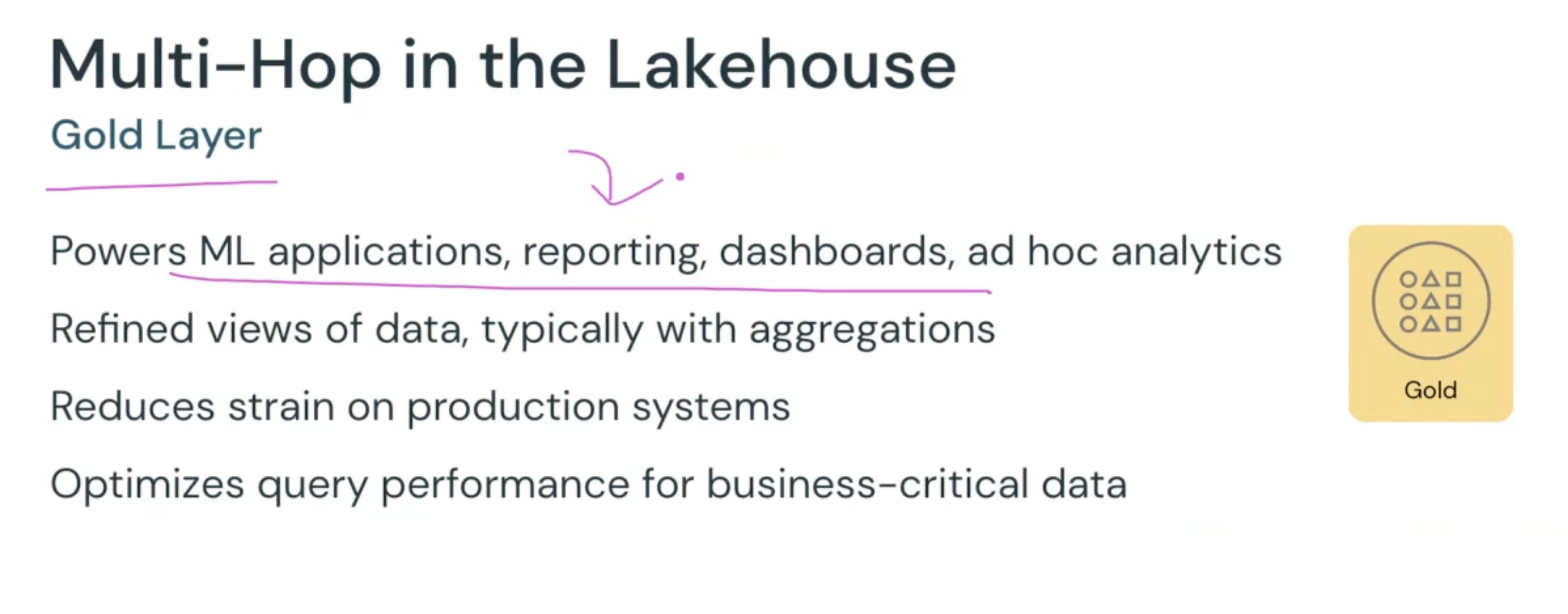
This is the bronze/silver/gold layout, which Databricks also calls the medallion architecture. Bronze is the raw data as it arrived, silver is cleaned, deduplicated and schema-enforced but still at the original grain, and gold is aggregated for dashboards, reports and ML.
]]>
Debugging Spark Streaming in a Notebook2022-04-30T00:00:00+00:002022-04-30T00:00:00+00:00https://hattajr.github.io/2022/04/30/how-to-debug-spark-streamingMuhammad Hatta
Debugging Spark Streaming in a Notebook
For a while I was the entire data and AI team at a small startup. There was no senior engineer to ask, and I don’t have a CS degree either (I graduated in mechanical engineering, of all things). Nobody around me really talked about tests. So my idea of “testing” a Spark job was running the whole pipeline end to end and eyeballing the output.
Then I got stuck on a Spark API that wasn’t covered in the docs or on Stack Overflow. I don’t even remember which API it was anymore. But I had the idea to go look at how Spark’s own test suite uses this API, since the people who wrote the API must have tested it somewhere.
That’s where I found out you can actually drive a Spark job step by step from a notebook, feed it a small amount of data, and stop the query when the data is done. That felt like finding a gem. Ever since, the first thing I read to learn how a framework is really meant to be used is its test cases.
A streaming query doesn’t end. You call .start() and the query keeps running, waiting for new data forever. That’s the point in production, but in a notebook this means you either kill the cell by hand or you never really know if the stream finished processing the data you gave it.
I wanted to run a stream on a small slice of data, look at every micro-batch, and have the query stop on its own once there’s nothing left to process.
This is what I ended up with. It reads the change data feed of a Delta table, limits each micro-batch to a tiny size so I can see more than one batch, and polls the query status until the stream is idle.
foreachBatch hands you each micro-batch as a regular DataFrame, along with its batch id. Inside the function you can do anything you’d do with a normal DataFrame, such as count it, display it, write it somewhere, etc. That makes foreachBatch the easiest place to see the stream’s work.
maxBytesPerTrigger is a soft limit on how much data goes into one micro-batch. Setting the limit absurdly low (1K) forces the stream to split even a small table into several batches, so you can check that your logic also works across batches, since a single big batch can hide bugs. The source table needs change data feed enabled for readChangeFeed to work.
query.status returns a dict with message, isDataAvailable and isTriggerActive. When there’s no data available, no trigger running, and the query is past its startup phase, the stream has caught up and is safe to stop. The "Initializing sources" check is there because right after start() the other two flags are also false, and without that check the loop would stop the query before Spark processed anything. The time.sleep(5) at the top is there for the same reason, and it’s doing more work than it looks. Before the sources even start initializing, the status message is "Initializing StreamExecution" with both flags false too, so without the sleep the loop could still stop the query too early.
The polling loop works, but Spark also has a method for exactly this, query.processAllAvailable(). Its docstring says it “blocks until all available data in the source has been processed and committed to the sink” and that it’s “intended for testing”. So the whole loop can be two lines.
query.processAllAvailable()query.stop()
The catch from the docs is that if data keeps arriving, this can block forever, so use this on a fixed test table, not a live source.
]]>
Software Development Quality2022-04-09T00:00:00+00:002022-04-09T00:00:00+00:00https://hattajr.github.io/2022/04/09/software-development-qualityMuhammad Hatta
Software Development Quality
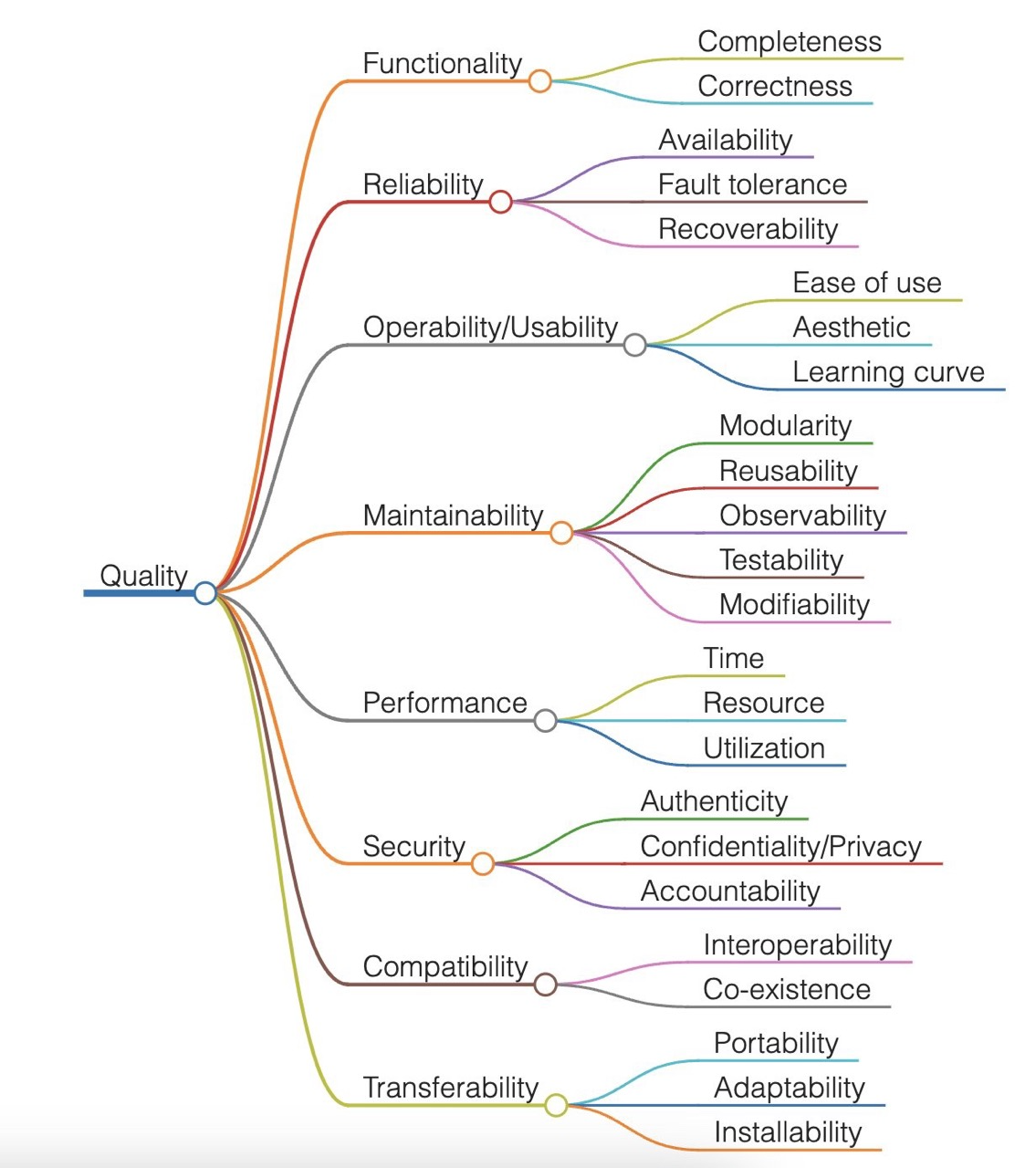
I came across this mind map in a post on Twitter (I’ve tried to find the original again to credit the author, but no luck), and it changed how I think about what to work on first when I build software.
Before this, I never thought about priorities at all. I just built things, and I kept falling into the same traps. For example, when building a data pipeline, I’d get obsessed with performance and spend my time making a job faster. And when building a web app, I’d get obsessed with the UI and UX instead, so the layout and how it feels to click around got all my attention.
Neither of those is wrong to care about. But while I was deep in one branch, I’d forget the tree had any other branches, and this picture made that obvious to me the first time I saw the whole tree laid out at once.
Performance is one branch out of eight, and usability is another one. The two at the top, functionality and reliability, are the ones everything else depends on. A pipeline that’s fast but produces the wrong numbers is worse than a slow one, because people trust its output and make decisions with it. And a nice-looking web app that falls over the moment someone uses it slightly differently than I expected isn’t done, no matter how good the screenshots look.
So now the order in my head is roughly this. First, the software does the right thing, completely and correctly. Second, the software keeps doing the right thing, which means it tolerates failures and I can recover from a break. Only then do I get to everything else, including the parts I personally enjoy the most, like making it fast or making it pretty.
If the map looks familiar, it’s very close to ISO/IEC 25010, the standard software product quality model, which has almost the same eight characteristics.
It’s a simple picture, but it set up the mindset I build software with now. Before I start optimizing or polishing anything, I check whether the first two branches are actually done.
]]>
Notes From an Advanced Apache Spark Training2021-12-10T00:00:00+00:002021-12-10T00:00:00+00:00https://hattajr.github.io/2021/12/10/advanced-spark-trainingMuhammad Hatta
Notes From an Advanced Apache Spark Training
I’ve been using Spark for a while now, but mostly from the outside. I knew which settings to change when a job was slow, and I even wrote some of them down back in August. But I couldn’t really explain why those settings worked.
So I went looking for something that explains what Spark is actually doing, and I found Advanced Apache Spark Training by Sameer Farooqui from Databricks. It’s a full-day class recorded at Spark Summit East in New York in March 2015. I’m going to say it plainly: this is one of the best resources for learning Spark I’ve found.
Don’t let the word “advanced” scare you off. He starts at what an RDD is and builds up from there to how Spark runs on a cluster, where the memory goes, how a job turns into stages and tasks, how PySpark works, how the shuffle was rebuilt to win the 100 TB sort benchmark, etc. Everything is drawn as machines, JVMs, task slots and partitions, so you end up with a picture in your head instead of a list of rules.
It’s also almost six hours long. If that’s too much, watch the RDD section, the cluster section and the jobs, stages and tasks section first. You can skip the Databricks Cloud demo (roughly 1:00:00 to 1:20:00) and the lab break (roughly 4:04:00 to 4:30:00). The slides are still on the Internet Archive, too.
Below are my notes in the order of the class, with a link to where each part starts, and a checklist of the tips at the end. One warning before you read them. This is Spark 1.2 and 1.3, so a few of the settings he shows don’t exist anymore. The ideas mostly still hold, and I put what changed by Spark 3.2 in the footnotes so the notes themselves stay true to the talk.
The first part is a tour of the ecosystem, and the useful bit is the argument for Spark. In MapReduce, a real analysis is a chain of jobs, and each job writes its result back to HDFS so the next one can read it. His example is k-means with Mahout, which needs about 17 MapReduce jobs even for 5 MB of data. Spark keeps the data in memory between steps, so one Spark job can be “20 maps and 15 reducers and a whole bunch of joins”.
He backs this with the speeds he uses for the whole class:
Where the data is
Rough read speed
Memory
10 GB/s
SSD
600 MB/s
Spinning disk
100 MB/s
Another node, same rack
125 MB/s (1 Gb/s)
Another rack
0.1 Gb/s
Spark doesn’t replace Hadoop, by the way. Hadoop is three projects (HDFS, YARN and MapReduce), and Spark replaces only the MapReduce engine. It reads almost anything through Hadoop’s InputFormat, which is why all of Spark’s I/O code was only ~400 lines for a long time.
Fun fact from this part: Spark started as a sample app for Mesos. Matei Zaharia wrote it to “spark” an ecosystem of apps on top of Mesos, and it outgrew Mesos.
He also recommends a few resources here that I’m adding to my list. The Learning Spark book (he says it has information you won’t find anywhere else), the Apache Spark user mailing list (most questions get answered within hours), Spark Packages for anything that isn’t in Spark itself, and the 2012 RDD paper.
The RDD section has the most useful idea in the whole class, and it’s also the simplest. An RDD is split into partitions, each partition needs one task, and each task is one thread in an executor. So an RDD with 5 partitions can use 5 cores and that’s it, even if your cluster has 1,000 of them. His rule of thumb is that 1,000 to 10,000 partitions in an RDD is perfectly normal, and a 100-node cluster needs at least 100.
You make an RDD by reading from storage or by calling parallelize on a collection in the driver. parallelize needs the whole dataset in the driver’s memory, so it’s only for prototypes and tests.
When you read a file from HDFS, you get one partition per block. A filter keeps the same number of partitions as its parent, even when some of them end up empty. This is why the usual pattern is to read, filter, and then coalesce or repartition to something that fits your cluster.
None of this runs until you call an action. Transformations are lazy, so reading and filtering only build a DAG of metadata. Spark doesn’t even check that the input file exists until you call count or collect.
And be careful with collect, because it pulls every partition into a driver that probably has a gig or two of heap. On anything big, save it or sample it first.
Caching is lazy too. Calling cache() only marks the RDD, and it’s stored the first time an action materializes it. The beginner mistake he calls out is caching the base RDD right after reading it. Do your filters and maps first, and cache the cleaned RDD that several actions actually reuse. A production app has hundreds of RDDs, so be picky.
It also doesn’t have to fit in memory. If only 30 of 100 partitions fit, 30 are cached and the other 70 get recomputed when they’re needed, so performance degrades instead of falling over.
Every RDD is defined by five things. It has a list of partitions, its dependencies on parent RDDs, a function to compute one partition from the parents, optional preferred locations (for example, where an HDFS block lives), and an optional partitioner for key/value data. That’s the whole interface, and it’s what makes recovery work.
A HadoopRDD has one partition per block and no parents. A filtered RDD has its parent’s partitions and a one-to-one dependency on it. A joined RDD has a shuffle dependency on both parents and a HashPartitioner. If you lose a partition, Spark recomputes just that partition from this information.
He also wants you to know the type of each RDD in your DAG, even if you have to draw it on paper at first. A ShuffledRDD tells you a shuffle happened right before it, and shuffles are the expensive part.
A few more tips from this part that I really liked:
If the docs describe a transformation in two sentences, go read the Scala source. It often has a full paragraph of comments on the same thing.
If you write to an external database, don’t open a connection per element. Use foreachPartition or mapPartitions, open one connection per partition, push everything through it, and close it.
Some connectors push work down to the source. The Cassandra connector, for example, can select only the columns you need and push a where filter into Cassandra, instead of reading the whole table into Spark and filtering there.
With Cassandra, spark.cassandra.input.split.size sets the rows per partition (100,000 by default). With very wide rows, lower it, for example to 2,000. He says getting this right is “more of an art than a science”.
He opens the cluster section by saying this was the hardest thing for him to figure out when he joined Databricks. Spark runs in local mode, Standalone, YARN or Mesos, and the architecture is different in each one.
What helped me was his summary at the end. There’s always a driver and executors, and tasks always run in executors. The only thing that changes is who decides where the executors go and who starts them.
Mode
Decides where executors run
Starts them
Local
nobody
you
Standalone
Standalone Master
Worker JVM
YARN
YARN Application Master
Node Manager
Mesos
Mesos Master
Mesos Slave
Compared to MapReduce, parallelism in Spark comes from threads and not processes. MapReduce starts a JVM per map or reduce task and has fixed map and reduce slots, so the reduce slots sit idle during a long map phase. Spark usually runs one executor JVM per machine with generic slots that can run any task. Handing a task to a slot is a thread handoff, not a JVM that takes a second to start.
The scheduler that matters most is the one in the driver, not the cluster manager. The cluster manager places executors. The driver places every task, and it tries to put each one on the executor that already holds its partition.
Oversubscribe your cores. This is the setting tip he spends the most time on. local gives you one thread, local[N] gives you N, and local[*] gives you one per logical core. If you have 6 free cores, don’t give Spark 6 slots. Start at 12 or 18, because threads aren’t pinned to cores and tasks spend part of their time waiting on I/O. He says some clients doubled their performance with just this change.
There are also about 20 internal threads in every executor, around 8 of them just for shuffle, so matching slots to cores exactly doesn’t work anyway. I’m not sure how well this holds for purely CPU-bound jobs and he doesn’t really say, so I’d measure it on my own workload before trusting the 2x.
In Standalone mode, the setting to understand is SPARK_LOCAL_DIRS. It’s where Spark writes both spilled cache partitions and shuffle files, and you can’t split the two. Use SSDs if you have them (even one helps), and list one mount point per disk as JBOD and not RAID, so Spark writes to all of them in parallel.
The Master and Worker JVMs are only the resource manager. They need about a gig each. The workers start executors and restart them if they crash, the Master restarts crashed workers, and --supervise makes the Master restart the driver too. The Master can be made highly available with ZooKeeper, and you can even add masters while apps are running.
The other Standalone names are confusing. SPARK_WORKER_CORES and SPARK_WORKER_MEMORY aren’t what the worker uses. They’re what it can hand out to executors. The worker’s own heap is SPARK_DAEMON_MEMORY.
For each app, you set spark.cores.max for the whole app and spark.executor.memory per executor. If you don’t, the first app greedily takes the entire cluster and starves everything after it. Note that spark.cores.max is the total for the app, not per executor. Set it to 100 on a 10-node cluster and you get 10 executors with 10 cores each, and since you should oversubscribe here too, he’d make it 200. And watch the Master UI for this misconfiguration he shows. An executor took all 3 cores of a worker but only 512 MB of its 7.7 GB of memory. If you take all the cores, take the memory too.1
His walkthrough of the Spark UI has a few things I didn’t know. A Spark app is made of jobs (one per action), a job of stages, and a stage of tasks.
Caching an RDD and opening the Storage tab shows the size of each partition, which is a cheap way to spot skew such as 90% of the data in one of 50 partitions. It’s also a way to count partitions, along with getNumPartitions. And deserialized Java objects take 2 to 3 times the file size, so a 100 MB file can need 200 to 300 MB of cache.
Settings can come from four places, and the precedence goes SparkConf in your code, then spark-submit flags, then spark-defaults.conf and spark-env.sh, then the built-in defaults. The Environment tab shows which value actually won.
The Executors tab has a thread dump button, which works as a poor man’s profiler if you click it a few times over a minute and look for your own code in the stacks.
On YARN, the Resource Manager starts an Application Master in a container, and the Application Master asks for the containers your executors run in. After that, the Resource Manager is out of the loop. If it crashes, running apps keep going, but they can’t get new containers.
Client mode runs the driver on your machine. This is what the shells use, so closing your laptop kills the app. Cluster mode runs the driver inside the Application Master so you can submit and walk away. Unlike Standalone, YARN lets you set --num-executors, --executor-memory and --executor-cores directly.
One gotcha with YARN is data locality. If you start 20 executors on a 100-node cluster, they may land on nodes that don’t have your HDFS blocks. Starting one executor per node avoids that.
Once an app finishes, its driver and its UI are gone. The Spark history server keeps the UI of past apps, so you can still look at how yesterday’s jobs ran.
YARN also has dynamic allocation, which he says had no docs yet, so he figured it out from the comments in ExecutorAllocationManager.scala. With spark.dynamicAllocation.enabled=true, the app starts at minExecutors and adds executors once tasks have waited longer than schedulerBacklogTimeout. It keeps adding more each sustainedSchedulerBacklogTimeout, growing exponentially up to maxExecutors, and it removes executors that have been idle for executorIdleTimeout.
His sizing rules are to give Spark at most ~75% of a machine’s memory, give each executor at least 8 GB, and keep a heap under about 40 to 45 GB on a normal JVM or the GC pauses get bad. The 75% isn’t arbitrary. If HDFS or Cassandra runs on the same machine, they need memory too, and giving executors everything leads to swapping.
cache() is just persist(MEMORY_ONLY), which stores deserialized objects and drops partitions that don’t fit. MEMORY_ONLY_SER stores one byte array per partition, which is smaller and easier on the GC but costs CPU. MEMORY_AND_DISK spills what doesn’t fit into the local dirs, always serialized. DISK_ONLY does what it says, the _2 levels keep two copies on two executors, and OFF_HEAP stored data outside the JVM (in Tachyon at the time).
His advice for picking one:
Use MEMORY_ONLY if it fits, then try MEMORY_ONLY_SER with a fast serializer.
Only spill to disk if the partitions are expensive to compute, since recomputing is often as fast as reading from disk.
Use the replicated levels sparingly. Spark isn’t HDFS, and lineage is the backup.
The cache is LRU and you can’t pin anything, so caching something huge evicts everything older. Use unpersist() when you’re done with an RDD. If an executor dies, its cache is gone and nothing rebuilds it in the background. Partitions only come back when something needs them again. In PySpark, cached data is always pickled anyway, so _SER or not makes no difference there.
The thing in this section that surprised me most: shuffle output stays on disk even if you never cache anything. Run the same action twice on a long DAG, and the second run only goes back to the last shuffle and reuses the map output files still sitting in the local dirs. That explains why a re-run can be so much faster, and why the UI shows “skipped” stages.
He also shows how the executor heap was split. It was 60% for cached RDDs with spark.storage.memoryFraction, 20% for shuffle buffers with spark.shuffle.memoryFraction, and the remaining 20% for your own code.2
If executors are getting killed for memory, figure out which of those three caused it. Running out during a shuffle means giving shuffle more. Running out in your own code means shrinking the other two, because there’s no setting for user memory itself. If you barely cache anything, he says you can drop the cache fraction to 10 or 20%, but not to zero. To see how much memory an RDD takes, look at the Storage tab, or at the driver log, which has a line like Added rdd_0_1 in memory on mbk.local:50311 (size: 717.5 KB, free: 332.3 MB) for every cached partition.
For serialization and GC, the default Java serializer is slow and it’s used for shuffles, spills, serialized caching, broadcasts, etc. So switch to Kryo in production (spark.serializer=org.apache.spark.serializer.KryoSerializer), register your classes, and raise the Kryo buffer if your objects are large.
GC cost depends on the number of objects and not their size, which makes an array of ints a lot cheaper than a linked list. You can measure it by starting executors with -verbose:gc -XX:+PrintGCDetails -XX:+PrintGCTimeStamps. The parallel GC is fine for batch, but for streaming he says to use CMS or G1 to avoid long stop-the-world pauses.
He calls this section the most important one for writing fast Spark code, and I agree. An action triggers a job. The DAG scheduler in the driver cuts the DAG into stages and hands each stage to the task scheduler, which sends individual tasks to executors and doesn’t know anything about stages at all. If you want to go deeper, he recommends Matei Zaharia’s “Spark Internals” talk on YouTube.
Independent stages can run at the same time, but a stage that needs both of them waits for the slower one. So if one parent stage takes 3 minutes and the other takes 17, move work into the fast one if you can.
Where the stages get cut comes down to narrow and wide dependencies. A dependency is narrow when each parent partition feeds at most one child partition. That covers map, filter, union, and a join of two RDDs that are already partitioned the same way. It’s wide when one parent partition feeds many children, for example groupByKey or a join of RDDs that aren’t co-partitioned. Wide means shuffle.
Narrow steps get pipelined, so one thread reads a block, maps it and filters it all within one stage. They’re also cheap to recover, because losing a partition means recomputing one parent partition. After a wide step, losing a partition might mean rereading the whole input. This is why he suggests caching the RDD right after an expensive shuffle. And if you do cache it, it’s worth using MEMORY_AND_DISK, so an evicted partition comes back from local disk instead of from the whole input.
Another one from this part: if a transformation is going to shuffle anyway, pass numPartitions to it. Otherwise the child inherits its parent’s partition count, which may not be what you want after the shuffle.
One might ask why the famous diagram in the RDD paper has no stage boundary at the groupBy right before the join. He asked Matei the same thing (“did you make a massive mistake in your white paper?”), and the answer is that the shuffled RDD is never really materialized. The join reads the shuffle’s map output files directly.
He also does a quiz from a Cloudera blog post by Sandy Ryza. How many stages does this need?
Just one, since every step is narrow. Add a groupByKey and a join and you get three.
toDebugString prints the lineage, and each level of indentation is a stage boundary. This is what the lineage of a PySpark word count looks like on Spark 3, with the call sites trimmed:
(4) PythonRDD[9] at RDD at PythonRDD.scala:53
 |  MapPartitionsRDD[8] at mapPartitions at PythonRDD.scala:145
 |  ShuffledRDD[7] at partitionBy at ...
 +-(4) PairwiseRDD[6] at reduceByKey at <stdin>:3
    |  PythonRDD[5] at reduceByKey at <stdin>:3
    |  log.txt MapPartitionsRDD[1] at textFile at ...
    |  log.txt HadoopRDD[0] at textFile at ...
The HadoopRDD followed by a map is something you get for free when reading text. That map converts Hadoop’s Writable types into normal ones.
He has a few rules for spotting a shuffle:
repartition, join, cogroup and anything named *By or *ByKey probably shuffle.
Passing numPartitions usually means a shuffle too, since distinct is a reduceByKey inside.
groupByKey and friends call combineByKey, which shuffles.
repartition(n) is literally coalesce(n, shuffle=True). So use coalesce to reduce partitions. A repartition to the same number is still useful, since it rebalances skewed partitions.
And if you only change the values of a key/value RDD, tell Spark the keys are untouched. Otherwise it drops the partitioner and the next join shuffles again. He shows this as map(..., preservesPartitioning=True).3
Someone asked how many transformations an app should have. His answer is that a few thousand is fine. Unlike MapReduce, there’s no reason to split a pipeline into many apps, so keep it as one Spark app.
This part isn’t in the talk. It’s the technique I reach for when a shuffle is unbalanced, and the class finally gave me the words for why it works, so I want it in the same place as everything else.
Here’s the problem. A shuffle sends every record with the same key to the same partition, because that’s what a HashPartitioner does. One partition is one task, and one task is one thread. So if one key has 40% of the records, one thread gets 40% of the work, and the stage can’t finish until that one task does. The Spark UI makes this obvious once you know to look. In the Stages tab, the max task duration is minutes while the median is seconds, and one task shows a huge shuffle read. Adding executors doesn’t help at all, since the extra cores just sit there waiting for that one thread.
Before fixing anything, I check which keys are hot:
from pyspark.sql import functions as F( df.groupBy("user_id") .count() .orderBy(F.desc("count")) .show(10))
Salting splits a hot key into several keys. You add a random number from 0 to N - 1 (the salt) to the key, so user_42 becomes (user_42, 0) through (user_42, 7), and the hash partitioner spreads those 8 keys over up to 8 tasks. Then you undo the salt at the end. How you undo it depends on what you’re doing.
For an aggregation, you aggregate twice. First by the salted key, which runs in parallel across the salts, and then again by the real key, which only has N partial results per key left to combine:
import randomSALTS = 8defadd_salt(kv): key, value = kvreturn (key, random.randrange(SALTS)), valuepartial = pairs.map(add_salt).reduceByKey(lambda a, b: a + b)totals = ( partial.map(lambda kv: (kv[0][0], kv[1])) .reduceByKey(lambda a, b: a + b))
This only works for aggregations you can combine in pieces, such as sums, counts, min, max, etc. A median doesn’t split like this. And to be fair to reduceByKey, it already combines on the map side before the shuffle, so a hot key in a plain sum hurts less than you’d think. Salting pays off most with groupByKey-style work and with joins, where nothing gets combined before the shuffle.
For a join, the salt has to match on both sides. You salt the big, skewed side randomly, and you copy each row of the other side once per salt value, so every salted key still finds its match:
from pyspark.sql import functions as FSALTS = 8events_salted = events.withColumn("salt", (F.rand() * SALTS).cast("int"))salts = F.array([F.lit(i) for i inrange(SALTS)])users_salted = users.withColumn("salt", F.explode(salts))joined = events_salted.join( users_salted, ["user_id", "salt"]).drop("salt")
The cost is that the small side is now N times bigger and goes through the shuffle too. So I keep N small (start around the skew ratio of the hottest key to an average key, then measure), and when only a few keys are hot, I salt only those keys and give every other row a salt of 0. If the small side fits in memory, skip all of this and broadcast it instead, like the talk shows in the next section. No shuffle means no skew.
On Spark 3, it’s also worth trying adaptive query execution before salting by hand. With spark.sql.adaptive.enabled on, Spark can split skewed partitions of a sort-merge join on its own.4 It only covers joins, though, so I still salt aggregations myself.
Without a broadcast, anything your closure uses is shipped with every task. A broadcast variable is sent once per executor and shared by its tasks, which is great for lookup tables, for a big feature vector in ML, or for avoiding a shuffle join when one side is small.
The implementation is fun. Broadcasts used to be plain HTTP from the driver, which made the driver’s network card the bottleneck. Now they use a BitTorrent-like protocol where the value is cut into ~4 MB chunks and executors fetch chunks from each other.
Accumulators are basically Hadoop counters, for things like counting blank lines or corrupt records. Tasks can only add to them, only the driver can read the value, and you can watch them in the Spark UI while a job runs. He says the Learning Spark book has a whole chapter on their edge cases.
The PySpark section changed how I think about PySpark the most. PySpark runs normal CPython, so any library with C extensions (NumPy, NLTK, etc.) just works. The SparkContext you get in Python is only a controller. It starts a normal JVM driver and talks to it over Py4J, which is fine for commands but slow for data.
Each executor JVM then starts daemon.py, which forks one Python worker per task slot. Data moves between the executor and those workers over a custom high-throughput pipe.
Reading and writing data happens in the JVM, so PySpark reuses all of Spark’s I/O code instead of reimplementing every source in Python. That’s how the first version of PySpark was only a few thousand lines. Your functions are pickled with cloudpickle, sent through the driver JVM to the executors, unpickled in the Python workers, and run there. Even collect avoids Py4J. The driver JVM writes the results to local files and Python reads them back, and big broadcasts go the same way.
The practical takeaway is that your own Python code runs at Python speed, but MLlib, shuffles, Spark SQL and DataFrames run inside the JVM. A DataFrame job from Python is about as fast as one from Scala.
Two settings from this part are worth knowing. You can switch the interpreter to PyPy with PYSPARK_PYTHON=pypy and PYSPARK_DRIVER_PYTHON=pypy, with speedups from 1.05x on a sort to 48x on a stats job, as long as you don’t need C extensions. And each Python worker gets 512 MB by default, which you can raise with spark.python.worker.memory.
The 100 TB sort is his favorite part, and it’s easy to see why. Sorting is the purest test of the shuffle, since sorting 100 TB means ~500 TB of disk I/O and ~200 TB over the network. The rules also said the data starts on disk, so no caching was allowed at all.
Hadoop (2013)
Spark (2014)
Spark, 1 PB
Data
102.5 TB
100 TB
1,000 TB
Time
72 min
23 min
234 min
Nodes
2,100
206
190
Cores
50,400
6,592
6,080
Per node
0.67 GB/min
20.7 GB/min
22.5 GB/min
That’s the same data sorted 3x faster on 10x fewer machines, in the public cloud. Spark tied for first with TritonSort from UC San Diego, a system built to do nothing but sort.
The setup was 206 i2.8xlarge EC2 machines with one big executor each, 32 slots, 8 SSDs and about 9.5 Gb/s between two random nodes. They used HDFS short-circuit reads, turned off speculative execution and compression, set locality wait to infinite, set spark.shuffle.spill=false so reducers kept everything in memory, and used sun.misc.Unsafe to keep data off the heap so GC never ran. HDFS blocks were 3.6 GB, which made 28,000 blocks, so the maps and the reduces each ran in 5 waves. He’s very clear that this is a benchmark setup and not something to copy into production.
The engineering behind it was three changes. The first is the new shuffle. The old hash-based shuffle had each map task keep one open file per reducer and write into all of them, which falls apart around 10,000 reducers because of the per-file buffers. The new sort-based shuffle (SPARK-2045) sorts a bit of the input at a time, writes one file at a time, and merge-sorts them into a single file indexed by reducer. It’s been tested with 250,000 reducers. He adds that for a small number of partitions the hash-based one might still be a bit faster, since it skips the merge.5
The second is the Netty transport (SPARK-2468), which sends map output straight from the file to the network card instead of copying it through a kernel buffer and the executor first. The third is the external shuffle service (SPARK-3796). The Worker or Node Manager serves map output instead of the executor that wrote it, which takes load off busy executors. It’s also required for dynamic allocation, since otherwise a removed executor’s shuffle files would disappear before the reducers fetched them.
The result saturated everything. The map phase hit ~3 GB/s of disk per node and the reduce phase hit ~1.1 GB/s of network per node, which is the whole 10 Gb link. On the reducer side, there’s also a limit on how much data each reducer pulls at once (48 MB by default) so it doesn’t flood its own network card.
The class ends with Spark Streaming.6 A DStream is a sequence of RDDs, one per batch interval, and transformations you apply to the DStream run on every RDD it produces. The point is that you write batch and streaming code with the same API instead of MapReduce plus a separate Storm codebase. In this version, the Python API couldn’t read from Kafka or Flume yet, only files and sockets.
Batches can be as small as ~500 ms. He says that covers 90 to 95% of real-time use cases, and the rest (high-frequency trading, for example) need something like Storm.
A receiver is a long-running task that permanently takes one slot, which is why a streaming app in local mode needs at least local[2]. The receiver cuts incoming data into a block every 200 ms and replicates each block to a second executor. So with a 600 ms batch interval, each batch’s RDD has 3 partitions. The 200 ms block interval is configurable, and it’s effectively your partition size, but he says Tathagata Das (who wrote Spark Streaming) told him you probably don’t need to touch it. local[2] is also only the minimum. In general, you want way more threads than that.
The rule that matters is that processing time has to stay below the batch interval, or you fall further behind with every batch. The easy fix is a smaller batch interval with less data per batch, down to about 500 ms. You can also repartition early to get more parallelism. And one receiver is one thread, so to ingest more you run several receivers, one per Kafka topic for example, and union the DStreams.
The streaming tab in the UI shows processing time percentiles over the last 100 batches, the input rate, and each receiver, which is where you’d see that you’re falling behind.
He finishes with the API. transform gives you any RDD operation that DStreams don’t expose, for example joining each batch with a static RDD of spam data. updateStateByKey keeps state across batches and needs a checkpoint directory. Windows like reduceByKeyAndWindow(..., 30, 10) mean the last 30 seconds computed every 10 seconds, and both numbers must be multiples of the batch interval. Output operations such as saveAsTextFiles and foreachRDD write the results out.
Then the class ends at exactly 5 PM, which he admits surprised him too.
These are all the tips from the class in one place, so I can come back to this list without rewatching six hours:
Aim for at least as many partitions as cores (1,000 to 10,000 is normal), and coalesce or repartition after a big filter.
Never collect something big. Save it or sample it first. Use parallelize only for tests.
Cache the cleaned RDD that several actions reuse, not the base RDD you just read, and unpersist it when you’re done.
Pick MEMORY_ONLY, then MEMORY_ONLY_SER with Kryo, and only use disk when recomputing is expensive. Use MEMORY_AND_DISK for RDDs right after an expensive shuffle.
Use Kryo in production and register your classes.
Executor heaps between 8 GB and ~40 GB, and at most ~75% of the machine for Spark, leaving room for HDFS or Cassandra on the same node.
Cache right after an expensive shuffle, and pass numPartitions to transformations that shuffle anyway.
Oversubscribe task slots 2 to 3 times the free cores, then measure.
Put SPARK_LOCAL_DIRS on SSDs, one mount per disk, no RAID.
In Standalone, always set spark.cores.max (the total for the app, oversubscribed) and spark.executor.memory, and give executors the memory to match their cores.
On YARN, use client mode for shells and cluster mode for jobs you walk away from, and run the history server.
Turn on the external shuffle service whenever you use dynamic allocation.
Learn which transformations shuffle, read toDebugString, and balance the work between parallel stages.
Use mapValues (or preservesPartitioning) when the keys don’t change.
When one task in a stage takes far longer than the median, find the hot keys and salt them. Aggregate twice for aggregations, and copy the small side once per salt for joins (or broadcast it if it fits).
Use one connection per partition, not per element, when writing to a database.
Broadcast small lookup tables instead of joining them, and use accumulators for counters.
In PySpark, prefer DataFrames and SQL so the work stays in the JVM. Try PyPy for pure Python code, and raise spark.python.worker.memory if workers run out.
In streaming, keep processing time under the batch interval, add receivers to ingest more, and use CMS or G1 instead of the parallel GC.
Check the Storage tab for skew, the Environment tab for which settings won, and thread dumps for hot code.
Don’t use Spark to answer web requests. Someone asked about it in the Q&A, and his answer was that Spark is a batch engine and isn’t meant for millisecond queries. Run a batch job that fills a database such as Cassandra, and serve the app from that.
Standalone has caught up since. spark.executor.cores now lets one worker run several executors of the same app, so the SPARK_WORKER_INSTANCES trick he shows for big machines isn’t needed, and dynamic allocation works in Standalone with the external shuffle service.↩︎
These fractions were replaced by unified memory in Spark 1.6. spark.memory.fraction (0.6 by default) is now one pool that caching and execution borrow from each other, and spark.memory.storageFraction (0.5) is the part cached data is protected in. The old settings are gone in Spark 3, but his advice to figure out whose memory ran out still applies. Tachyon has also been renamed Alluxio, and OFF_HEAP now uses Spark’s own off-heap memory.↩︎
That flag exists on PySpark’s map. In Scala, use mapValues, which keeps the partitioner on its own.↩︎
Adaptive query execution came in Spark 3.0 and is on by default since 3.2. The skew handling is spark.sql.adaptive.skewJoin.enabled, which is on once AQE is on, and it decides what counts as skewed with skewedPartitionFactor and skewedPartitionThresholdInBytes.↩︎
The hash-based shuffle was removed in Spark 2.0, so sort-based is the only one now. The off-heap Unsafe work from this benchmark also grew into Project Tungsten, which is why DataFrames manage their own memory today.↩︎
DStreams still work, but Structured Streaming, built on DataFrames, is what Spark recommends for new streaming jobs.↩︎
]]>
Apache Spark Configuration Experiences2021-08-05T00:00:00+00:002021-08-05T00:00:00+00:00https://hattajr.github.io/2021/08/05/spark-configuration-experiencesMuhammad Hatta
Partition configuration
- Input partition
- control the input partition by using spark.sql.files.maxPartitionBytes
- default is 128mb, but if you will have explode operation, consider to decrease this value
- control the shuffle partition by using spark.sql.shuffle.partitions
- default is 200 partition, but if you will have explode operation, consider to decrease this value
- control the output partition by using .option("maxRecordsPerFile", "x")
Estimate the number of partition
import numpy as npsep = "*" * 70print(f"\n\n{sep}")"""IF THE SHUFLLE PARTITION IS NOT CHANGEIN THE SPARK UI, PLEASE CHECK THE FOLLOWING:- REMOVE THE TABLE IN MINIO UNDER THE SAME NAME OF THE RUNNING SPARK APP"""CONS_SHUFFLE_RATIO_ROWS = 1/21CONST_MB_TO_BYTES = 1024 * 1024total_num_rows = 5932823 <- you only need this asinputseed_no = 123num_cores = int(32)total_available_memory_gb= 125reserved_memory_gb = 35target_input_max_bytes_per_file_mb = 4target_input_max_bytes_per_file_bytes = ( target_input_max_bytes_per_file_mb * CONST_MB_TO_BYTES)max_records_per_file = 1_000num_shuffle_partitions = int( np.ceil(total_num_rows * CONS_SHUFFLE_RATIO_ROWS))print(f"{'SEED NO':<30} : {seed_no}")print(f"{'NUM CORES':<30} : {num_cores}")print(f"{'TOTAL MEMORY DRIVER':<30} : "f"{total_available_memory_gb-reserved_memory_gb} gb")print(f"{'MEMORY PER CORE':<30} : "f"{(total_available_memory_gb - reserved_memory_gb)" f"/num_cores} gb")print(f"{'MAX INPUT SIZE':<30} : "f"{target_input_max_bytes_per_file_mb} mb / "f"{target_input_max_bytes_per_file_bytes} bytes")print(f"{'SHUFFLE PARTITION':<30} : "f"{num_shuffle_partitions} partitions")print(f"{'MAX RECORDS PER FILE':<30} : "f"{max_records_per_file} records")print(f"{sep}\n\n")